

WordPress is a powerful and flexible content management system (CMS) that allows users to store and retrieve data via the wp_options table.
One of the lesser known but crucial features of this table is the concept of autoload options wordpress.
Autoloading optimizes performance by automatically loading certain options with every page load, reducing the number of database queries required.
However, when not managed properly, autoloaded options can also become a bottleneck, especially for large sites.
In this article, we’ll explore 10 key features of autoloaded options in WordPress, discuss their real-world use cases, and share user reviews on how this feature impacts website performance.
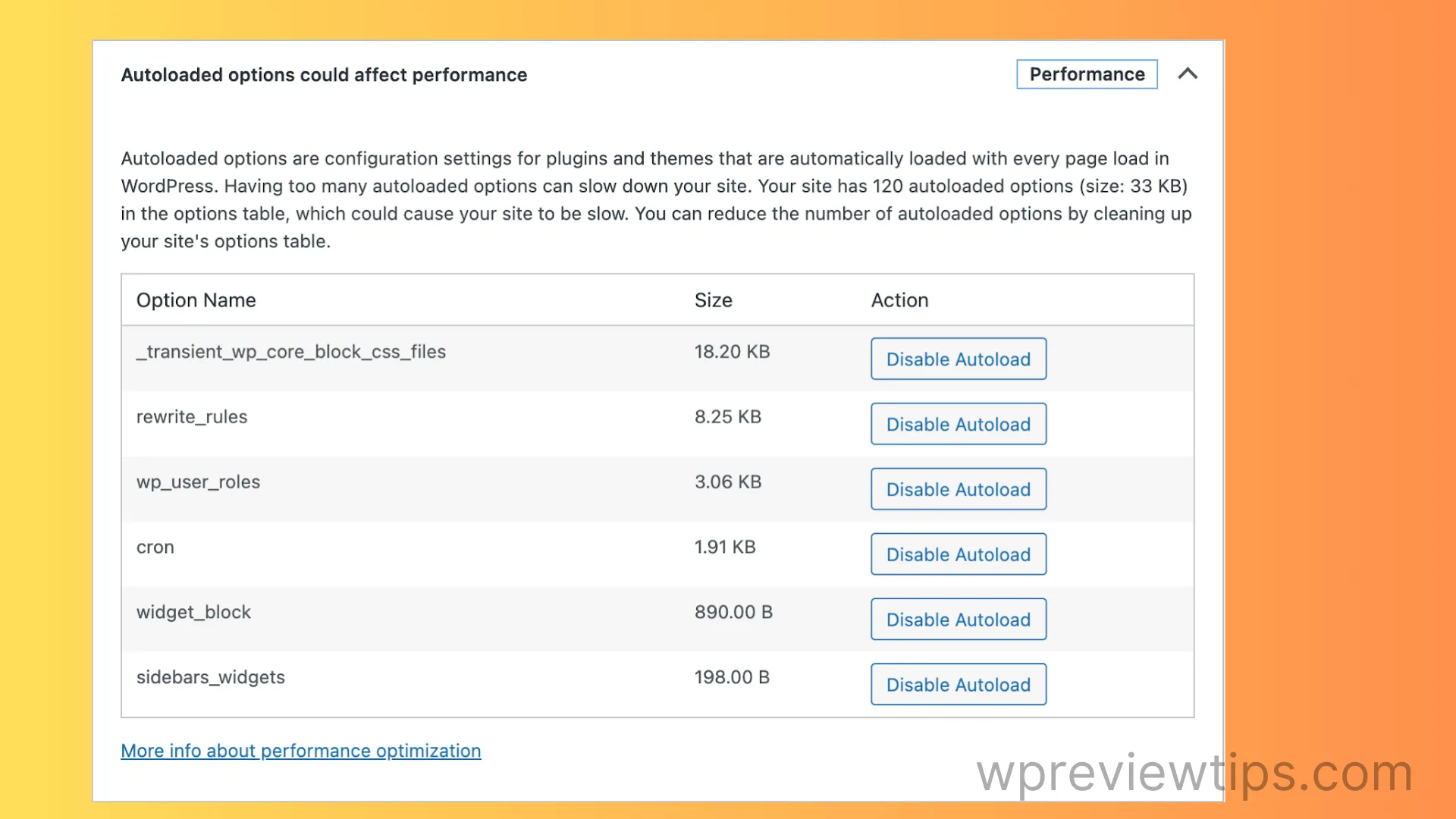
We’ll also look at how forums like WordPress.org have discussed the usefulness and challenges of autoloading options and provide insights into how developers and site owners can manage this feature effectively for optimal performance.
What are Autoloaded Options in WordPress?
Autoloaded options are values stored in the wp_options table that are automatically loaded by WordPress on every page request.
These options are typically used for settings or configurations that need to be available across multiple pages.
For example, plugin settings, theme customizations, or core WordPress functionalities are often autoloaded to ensure they are instantly accessible without additional database queries.
While autoloading can improve performance by reducing the number of database requests, having too many large autoloaded options can slow down page load times and even cause errors, particularly if the total size of autoloaded data exceeds the memory limits of the server.
As of WordPress 6.6, new features and optimizations were introduced to handle autoloaded options more effectively, including setting size thresholds for large options and dynamically determining whether an option should be autoloaded based on its usage.
Let’s explore 10 key features that make autoloaded options a fundamental aspect of WordPress performance management.
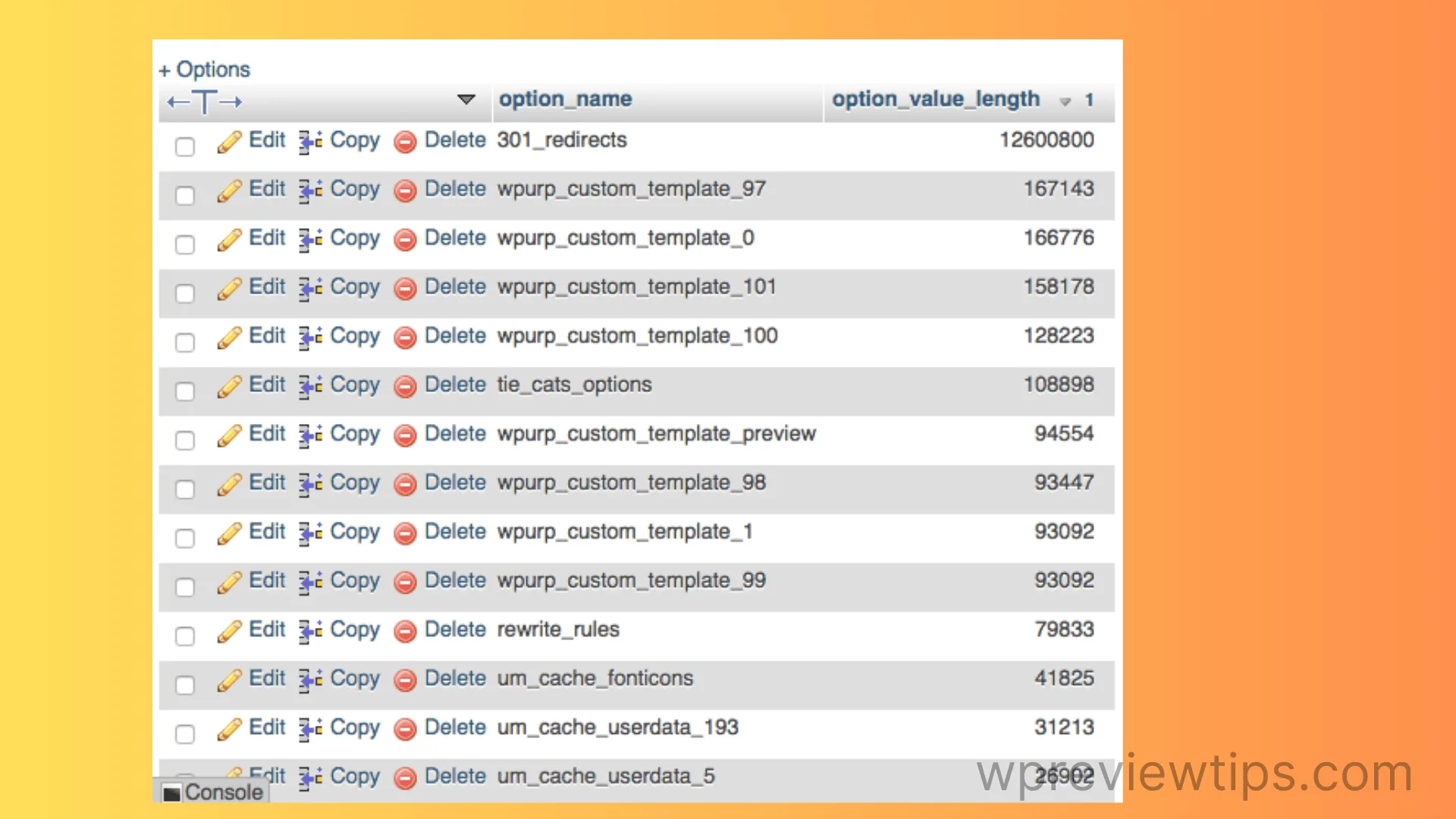
10 Features of Autoloaded Options in WordPress
1. Automatic Loading on Every Page
The most important feature of autoloaded options is that they are automatically loaded on every page of your site. This ensures that critical settings and configurations are always available without the need for additional database queries. This is particularly useful for global settings, like site URLs or plugin configurations, that need to be accessed across all pages.
2. Reduced Database Queries
By autoloading options, WordPress minimizes the number of database queries made on each page load. Instead of querying the database for each option individually, autoloaded options are fetched in bulk with a single query. This can significantly improve performance, especially on high-traffic websites where database queries can become a bottleneck.
3. Performance Impact for Large Options
WordPress automatically disables autoloading for options that exceed a certain size (150KB by default). This is a new feature introduced in WordPress 6.6 to prevent performance issues caused by loading excessively large options on every page. If you have a large option that needs to be autoloaded, you can override this behavior using the wp_default_autoload_value filter.
4. Dynamic Autoloading Decisions
Previously, developers had to explicitly set whether an option should be autoloaded when adding or updating an option. However, WordPress now uses a default value of null for the autoload parameter, allowing the system to dynamically decide whether an option should be autoloaded based on factors like option size and usage frequency. This makes it easier for developers to manage autoload behavior without needing to fine-tune every option manually.
5. Site Health Monitoring for Autoloaded Options
WordPress 6.6 introduces a new Site Health check that monitors the total size of autoloaded options. If the size exceeds 800KB, WordPress will flag it as a critical issue that could impact performance. This makes it easier for site owners and developers to identify and address performance bottlenecks related to autoloaded options.
6. Customizable Autoload Threshold
Developers can adjust the size threshold for autoloaded options using the wp_max_autoloaded_option_size filter. While the default threshold is 150KB, you can lower or raise this limit depending on your site’s performance needs. This feature is particularly useful for sites with custom caching solutions or non-standard server configurations.
7. Backward Compatibility for Older Options
WordPress maintains backward compatibility by continuing to support the old yes and no values for the autoload parameter. These are now mapped to true and false, respectively, ensuring that older plugins and themes that use these values will continue to function correctly.
8. New Autoload Values for Fine-Tuning
In addition to the true, false, and null values for autoload, WordPress has introduced new database values like auto-on and auto-off. These values allow for more granular control over whether an option should be autoloaded dynamically. For example, auto-on ensures that an option is autoloaded if it meets certain criteria, while auto-off disables autoloading for large options that are rarely used.
9. Improved Handling of Large Sites
For large websites with thousands of options, autoloading can become a performance bottleneck if not managed properly. WordPress now includes optimizations to handle large sites more efficiently, such as dynamically disabling autoloading for large options and reducing the size of autoloaded data. These improvements help prevent memory overload and reduce the risk of errors like 502 or 504 timeouts.
10. Developer-Friendly Filters and Hooks
WordPress provides a range of filters and hooks for managing autoloaded options, including wp_default_autoload_value and wp_autoload_values_to_autoload. These tools allow developers to customize autoload behavior based on specific site needs, making it easier to optimize performance without needing to modify core WordPress files.
Real-World Use Cases for Autoloaded Options
- Global Plugin Settings: Plugins often store their settings as autoloaded options to ensure they are available on every page without additional database queries. For example, a caching plugin might autoload its configuration settings to apply them globally across the site.
- Theme Customizations: Many themes use autoloaded options to store customization settings, such as colors, fonts, and layout preferences. This ensures that these settings are applied instantly across all pages of the site.
- API Keys and Credentials: Some plugins and themes store API keys or credentials as autoloaded options to ensure they are available for every request. This is common in eCommerce plugins, which need to authenticate with payment gateways on every page load.
- Critical Performance Settings: Autoloaded options are often used to store performance-critical settings, such as caching configurations or database query optimizations. These settings need to be available on every page to ensure consistent performance.
- Multisite Networks: In multisite installations, autoloaded options can be used to store network-wide settings that apply to all sites in the network. This ensures that these settings are consistently applied without needing to query the database for each site individually.
User Reviews of Autoloaded Options
Here are five user reviews from developers and site owners who have used autoloaded options in their WordPress sites:
- Jenn Webb (August 18, 2020): “Turning off autoload for certain options really sped up my WordPress site. After running a query to identify large autoloaded options, I disabled a few that were hogging resources, and the performance gains were noticeable!”
- Petros (June 3, 2020): “Autoloading is a double-edged sword. It helps with performance but can cause issues if not managed properly. I found that disabling autoload for infrequently used options made a big difference on my large multisite network.”
- Sybre Waaijer (June 19, 2024): “The new size threshold for autoloaded options is a game-changer. It forces developers to think critically about what should and shouldn’t be autoloaded, which can make or break performance on high-traffic sites.”
- Paul Bearne (June 18, 2024): “I was skeptical about the new dynamic autoload feature at first, but after implementing it on a client’s site, I saw a significant reduction in database load times. It’s a smart way to handle large options without overloading the server.”
- Press Programmer (June 19, 2024): “The Site Health check for autoloaded options is a useful tool. It helped me identify bloated options that were slowing down my site, and after disabling autoload for those, my site was much faster.”
Conclusion
Autoloaded options are a powerful feature in WordPress that can significantly improve website performance by reducing the number of database queries made on each page load. However, when not managed properly, they can also become a performance bottleneck, especially for large sites with many options. The new features and optimizations introduced in WordPress 6.6 make it easier for developers to manage autoloaded options effectively and prevent performance issues caused by large or unnecessary autoloaded data.
By understanding how autoloaded options work and using the tools provided by WordPress, developers and site owners can optimize their sites for speed and efficiency. Whether you’re managing a small blog or a large multisite network, taking control of your autoloaded options is a crucial step in ensuring your website performs at its best.
