
When you’re looking to build a WordPress website, one of the first decisions you’ll make is selecting the right WordPress theme.
Your theme dictates the design, performance, and customization options of your site.
Among the most popular WordPress themes today are Neve and Astra—two themes that are loved for their speed, flexibility, and seamless compatibility with page builders like Elementor and Gutenberg.
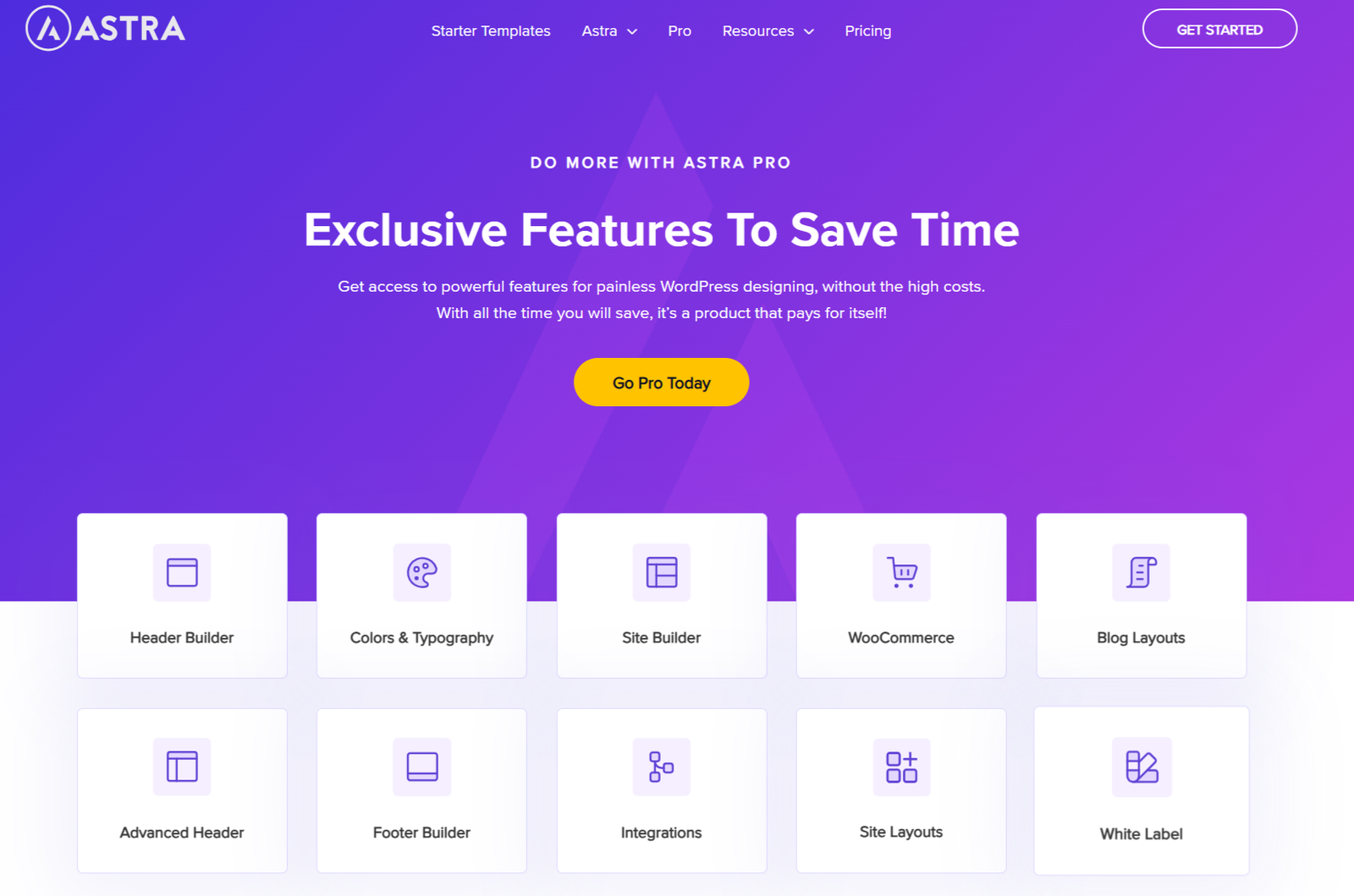
Astra provides a fast, multipurpose WordPress theme perfect for blogs, WooCommerce sites, and business websites.
With its free starter templates and Astra Pro version, it’s easy to customize your website’s header, footer, and layout.
On the other hand, Neve offers a user-friendly design with excellent header and footer customization, ideal for those using the WordPress Customizer or popular builders like Elementor and Beaver Builder.
In this article, we will compare Neve vs. Astra, exploring their features, pricing, performance, and much more. By the end of this post, you’ll be equipped with the knowledge to choose the best theme for your next WordPress site.

Why You Might Need a Page Builder-Friendly WordPress Theme
Before diving into the comparison of Astra vs. Neve, it’s crucial to understand why choosing a page builder-friendly WordPress theme is so important.
Page builders like Elementor, WPBakery, and Gutenberg make building websites easier for both beginners and professionals. They allow users to design websites through a drag-and-drop interface, eliminating the need for any coding knowledge.
A WordPress theme that is designed for page builders will provide greater customization and flexibility without requiring you to touch any code.
Both Neve and Astra are well-suited for this, providing fast and intuitive design experiences. The right theme can save you hours of design work while ensuring that your site is fully optimized.
An Introduction to the Themes
Before diving into the nitty-gritty details of the Neve vs Astra comparison, let’s take a quick look at each theme.
Astra Theme
Astra is one of the most popular WordPress themes on the market, known for its lightweight design and flexibility.
This theme is ideal for anyone from bloggers to business owners, as it offers robust features for eCommerce, blogs, and corporate websites.
Overview
Astra is known for being a fast, lightweight, and flexible WordPress theme. It has become one of the most popular WordPress themes due to its versatility and speed. Astra is optimized for performance, ensuring your site loads quickly and provides a better user experience.
Astra is one of the most popular WordPress themes on the market, known for its lightweight design and flexibility.
- Speed and Performance: Astra is lightweight and optimized for performance. It has one of the fastest page load times among WordPress themes. According to the WordPress community, Astra’s default installation has a page load time of just 0.5 seconds.
- Customization: Astra offers a variety of customization options, especially with the Pro version. You can customize the header, footer, layouts, typography, and colors without needing to write a single line of code.
- Compatibility: Astra is compatible with popular page builders like Elementor, Beaver Builder, and Gutenberg. It also integrates seamlessly with WooCommerce, making it ideal for eCommerce sites.
Key Features of Astra:
- Page builder compatibility: Works seamlessly with Elementor, Gutenberg, and Beaver Builder.
- Customization: Offers extensive design options via the WordPress Customizer.
- WooCommerce support: Perfect for building an online store with customizable product pages.
- Speed optimization: Astra is one of the fastest WordPress themes available.
Neve Theme
Overview
Neve is another popular WordPress theme that focuses on simplicity and speed. Like Astra, it’s built for performance and provides a user-friendly experience. Neve is perfect for those looking to build a personal blog, a small business website, or an online store.
Neve is a lightweight WordPress theme designed for fast loading and easy customization. It’s known for its mobile-first design and responsive nature, making it a great choice for users looking to build a fast and user-friendly website. Neve is ideal for small business websites, personal blogs, or portfolios.
- Speed and Performance: Neve is optimized for speed and performance. The theme has an impressive page load time, and it’s highly recommended by the WordPress community for anyone who wants a fast website. Neve’s mobile-first design ensures your website performs well on all devices.
- Customization: Neve offers a wide range of customization options. With its free version, you can change colors, fonts, and layouts easily. The Pro version enhances the experience by providing advanced features such as custom headers and footers.
- Page Builder Support: Neve is also fully compatible with page builders like Elementor, Beaver Builder, and Gutenberg. It allows you to create custom page layouts without needing to write code.
Key Features of Neve:
- Elementor compatibility: Works perfectly with Elementor and Gutenberg for easy page building.
- Speed: Neve is designed to be fast and optimized for mobile use.
- WooCommerce integration: Helps you set up online stores with ease.
- Customizable headers and footers: Tailor your site’s header and footer for a personalized look.
Neve vs Astra: Key Comparisons
When it comes to choosing the best WordPress theme, both Astra and Neve offer powerful features, flexibility, and performance.
But each one has its own unique advantages, catering to different types of websites and users. Below is a comprehensive comparison of Astra vs. Neve, exploring eight key factors that will help you make an informed decision about which theme is the best fit for your WordPress site.
Key Differences: Neve vs Astra
While both Astra and Neve are fantastic themes, there are a few differences that set them apart. Here’s a comparison based on key features:
| Feature | Astra Theme | Neve Theme |
|---|---|---|
| Speed | Very fast (0.5s load time) | Fast and mobile-first design |
| Free Version | Offers a solid free version | Offers a free version with essential features |
| Customization | Extensive customization options, especially with Astra Pro | Customization available in free and Pro versions |
| WooCommerce Support | Seamless WooCommerce integration | Excellent WooCommerce compatibility |
| Page Builder Support | Works with Elementor, Beaver Builder, and Gutenberg | Works with Elementor, Beaver Builder, and Gutenberg |
| Header & Footer | Customizable with Astra Pro | Advanced customization with Neve Pro |
| Starter Sites | 100+ starter templates | 50+ starter templates |
Features Comparison: Neve vs Astra
Features are the foundation of any WordPress theme, as they determine the flexibility, customization, and overall usability of your site. Let’s compare the features of Astra and Neve in more detail.
Astra Features
- Starter Templates:
One of Astra’s most appealing features is its extensive library of starter templates.- Astra offers over 150+ starter templates, catering to various industries, including eCommerce, blogging, corporate websites, and more.
- These templates are fully customizable and can be imported with just one click, allowing you to launch your site in a matter of minutes.
- Whether you’re building a personal blog, business site, or online store, Astra’s diverse range of templates ensures there’s something for everyone.
- Customization Options:
Astra Pro elevates customization by offering users sophisticated design options.- You can customize everything from headers and footers to typography, colors, and layout options via the WordPress Customizer.
- With the Pro version, you can even create custom header layouts and transparent headers, enabling you to create a unique look for your site without writing any code.
- SEO-Optimized:
Astra is built with SEO best practices in mind. It has schema markup integrated into its design, which helps search engines better understand your content and improves your site’s visibility. Astra is also lightweight, ensuring your site loads quickly—a crucial factor for both user experience and SEO rankings.
- WooCommerce Support:
For those looking to build an online store, Astra provides outstanding support for WooCommerce. You can customize product pages, checkout pages, and even product galleries. Astra Pro enhances this experience by offering features like custom product layouts, advanced filters, and WooCommerce quick view.
Neve Features
- Lightweight and Fast:
- Neve is designed with speed and performance in mind. It’s one of the lightest WordPress themes available, with a focus on fast loading times.
- Neve is built using clean and optimized code, ensuring quick performance even on mobile devices. This makes it an excellent choice for users who prioritize site speed and user experience.
- With Neve, you can easily create a high-performance WordPress site without the need for heavy plugins or custom coding.
- Mobile-First Design:
- Neve’s mobile-first approach ensures that your website is fully responsive, adapting seamlessly to mobile devices and tablets.
- This is particularly important in today’s world, where a significant portion of internet traffic comes from mobile devices.
- Neve automatically adjusts your content to provide an optimal viewing experience on all screen sizes, ensuring a smooth browsing experience for users across devices.
- Customization via WordPress Customizer:
- Like Astra, Neve offers a user-friendly customization interface via the WordPress Customizer. It allows you to easily adjust layout settings, color schemes, typography, and more.
- Neve offers more simplified design options, which might be ideal for users who want to quickly set up a site without being overwhelmed by too many settings.
- It’s a great fit for those who are looking for a minimalist, streamlined design without excessive features.
- WooCommerce Integration:
- Neve comes with excellent support for WooCommerce, offering essential features like customizable product pages, optimized product images, and easy checkout.
- Neve also supports custom layouts for product pages, which is particularly helpful for users looking to create unique eCommerce stores.
Winner: Astra
While both Astra and Neve offer great features, Astra takes the lead due to its broader range of starter templates, more advanced customization options, and WooCommerce enhancements.
Performance and Speed: Neve vs Astra
One of the most critical aspects of any WordPress theme is site performance, especially in terms of page speed. Fast websites provide a better user experience, reduce bounce rates, and improve SEO rankings.
- Astra Performance Stats:
- Astra is known for its lightweight design. The core Astra theme (without additional plugins or features) weighs around 50 KB, making it one of the fastest WordPress themes available.
- On a test using Google PageSpeed Insights, Astra scores consistently high, achieving 90+ for desktop performance and 80+ for mobile.
- Astra Pro further improves performance, with customizations allowing users to disable unused features for faster load times.
- Neve Performance Stats:
- Neve is built with speed in mind and is optimized for performance. The theme weighs around 28 KB on its own, making it incredibly lightweight and fast.
- Neve scores 90+ on Google PageSpeed Insights for both desktop and mobile tests. It is designed to load quickly across all devices, particularly for mobile-first websites, which is crucial as more users browse on their smartphones.
- Neve also excels in core web vitals, which are essential for modern SEO.
Winner: Neve
While both Astra and Neve offer excellent performance, Neve takes the slight edge due to its superior mobile optimization and its consistent ability to maintain fast load times across a variety of devices, especially in mobile-first environments. If site speed is your primary concern, Neve will likely offer a slight advantage.
Page Builder Compatibility: Neve vs Astra
A theme’s compatibility with page builders is crucial for users who want to easily design their sites without writing code. Both Astra and Neve support popular page builders like Elementor and Gutenberg, but how well they integrate with these tools makes a difference.
Astra Page Builder Compatibility
Astra is known for its seamless compatibility with page builders, particularly Elementor, Beaver Builder, and Gutenberg. Astra doesn’t just support these builders; it enhances the experience by providing features like custom page templates and header/footer builder integrations. You can build custom layouts for single pages, archives, and even category pages using Elementor, making it a perfect choice for users who want maximum flexibility and control over their site design.
- Advanced Customization with Page Builders:
Astra Pro offers an additional layer of advanced customization. For instance, you can utilize the header builder to manipulate elements such as logos, menus, and search bars, thereby creating a unique header layout using Elementor. - No Theme Lock-in:
Astra gives users the freedom to change the page builder as needed. You’re not tied to one particular builder, making it a versatile theme for users who may want to experiment with different page builders in the future.
Neve Page Builder Compatibility
Neve is also highly compatible with Elementor, Gutenberg, and other popular page builders. Neve offers built-in customizer settings and pre-designed layouts, which work well with Elementor to help users create stunning pages quickly. However, Neve focuses more on simplicity and minimal customization options compared to Astra, making it a good choice for users who don’t need advanced layout control.
- Streamlined Page Builder Integration:
Neve integrates well with Elementor and Gutenberg, but it lacks the deep customization options that Astra offers. This might make Neve more suitable for users who prefer a clean, simple website layout without too much customization. - Header and Footer Layouts:
Neve allows users to customize their header and footer through the WordPress Customizer and integrate them with Elementor. However, the customization options are not as extensive as what Astra offers, especially for complex designs.
Winner: Astra
Astra is the winner here due to its advanced compatibility with a range of page builders, particularly when it comes to creating highly customized layouts and integrating advanced features.
Customization and Features: Neve vs Astra
Both Astra and Neve excel in providing a variety of customization options, but they differ in depth and complexity.
- Astra Customization:
- Astra Pro gives you a wealth of customization options, including advanced header and footer controls, typography settings, and layout options.
- With Elementor, Beaver Builder, and Gutenberg integration, Astra gives you access to more advanced design options, such as custom layouts for individual pages, dynamic content, and headers with mega menu support.
- Astra’s starter templates are unparalleled, offering more than 150+ pre-designed templates for business, eCommerce, blogging, portfolio sites, and more.
- WooCommerce customization is a major strength for Astra, offering a robust range of features like product page layouts, quick view options, and filter widgets.
- Neve Customization:
- Neve focuses on simplicity and ease of use. It offers basic customization options through the WordPress Customizer, which are perfect for users who don’t need to spend a lot of time on intricate design details.
- The free version of Neve comes with limited templates, but the Pro version offers a range of starter sites and custom layouts for blogs, business sites, and portfolio sites.
- Neve Pro also allows for customizing the header and footer layouts, but the customization options are not as extensive as Astra’s. WooCommerce support is present but doesn’t offer the same level of advanced features as Astra.
Winner: Astra
While Neve is an excellent theme for users who need basic customization and simplicity, Astra wins this round due to its far greater flexibility, advanced features, and customization options—particularly for eCommerce sites or complex websites requiring detailed design tweaks.
Pricing and Licensing: Neve vs Astra
Pricing is always a key factor in choosing a theme, especially when considering premium features. Both Astra and Neve offer a free version, but the premium versions unlock additional functionality.
Astra Pricing
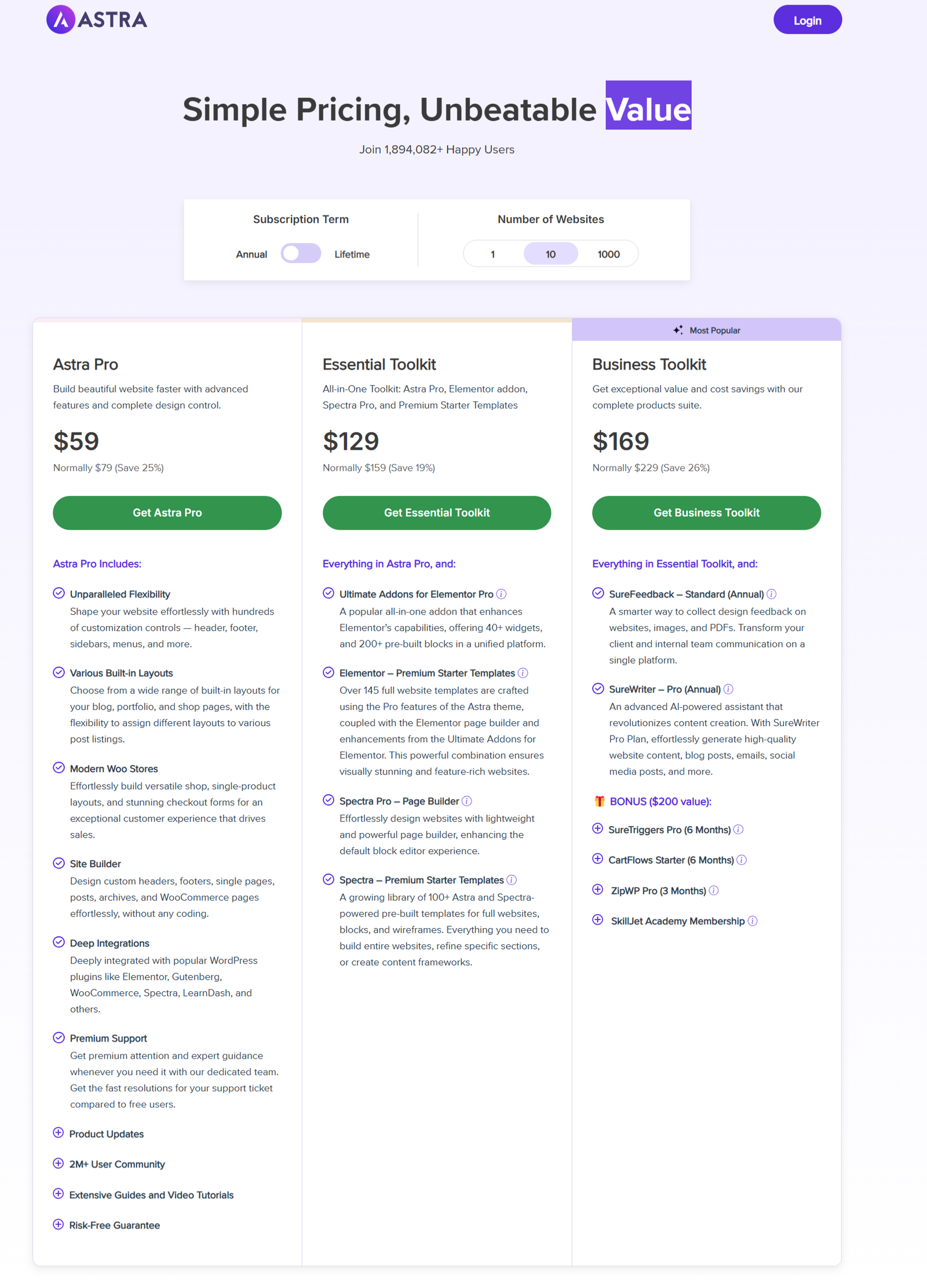
- Astra Free Version: The free version of Astra is feature-rich, providing basic design options, starter templates, and page builder compatibility. However, to unlock the full potential of Astra, you will need to upgrade to Astra Pro.
- Astra Pro Version: The Pro version of Astra starts at $59 per year. This gives you access to advanced customization options, more starter templates, WooCommerce enhancements, and the ability to create custom headers and footers. Astra also offers the Agency Bundle for $249 per year, which includes additional premium plugins like WP Portfolio and Ultimate Addons for Elementor.
Neve Pricing
- Neve Free Version: The free version of Neve offers a clean design, mobile optimization, and basic customization. It’s suitable for those looking for a straightforward WordPress site without needing advanced features.
- Neve Pro Version: The Pro version starts at $69 per year. Neve Pro offers more header options, custom layouts, and additional WooCommerce features. It also provides more starter sites and access to Neve’s Cloud library, which helps speed up your website’s performance by delivering assets from the cloud.
Winner: Astra
While both themes have reasonable pricing, Astra Pro offers more features and flexibility at a slightly lower cost, making it the more cost-effective option for users seeking advanced features.
Ease of Setup and Use: Neve vs Astra
Setting up a WordPress site should be a hassle-free process, especially for beginners. Both Astra and Neve aim to simplify the setup process, but which one is easier to use?
Astra Setup Process
Astra’s setup process is incredibly user-friendly, thanks to its starter templates and integration with Elementor and Gutenberg. With just one click, you can import a demo site and start customizing it. Astra also provides a detailed setup wizard that guides you through the process of installing the theme and configuring your settings.
Neve Setup Process
Neve also offers an easy setup process with its One-Click Demo Importer, making it simple to import pre-built websites. The Neve Customizer interface is clean and minimalistic, offering a fast way to adjust your site’s settings. For beginners, Neve’s simple design options and straightforward setup process make it an attractive option.
Winner: Tie
Both Astra and Neve offer simple and quick setup processes. However, Astra’s greater variety of starter templates gives it a slight edge for users who need more pre-built designs to choose from.
WooCommerce Support: Neve vs Astra
For those building eCommerce websites, WooCommerce compatibility is essential. Both themes offer excellent support for WooCommerce, but there are some differences.
- Astra WooCommerce Support: Astra offers built-in WooCommerce features such as custom product page templates, advanced checkout options, and customizable cart pages. The Astra Pro version offers even more eCommerce features, such as product gallery layouts and product filters.
- Neve WooCommerce Support: Neve also supports WooCommerce with customizable product pages, an optimized checkout experience, and mobile responsiveness. However, Neve lacks some of the more advanced features found in Astra’s Pro version.
Winner: Astra
Astra provides more advanced WooCommerce features, making it the better choice for users building online stores.
WooCommerce Integration: Neve vs Astra
For users building online stores, WooCommerce compatibility is essential. Both themes offer strong WooCommerce integration, but they provide different levels of functionality.
- Astra WooCommerce Features:
- Astra Pro offers full-fledged WooCommerce customization, including the ability to customize product page layouts, checkout pages, product galleries, and filters.
- Astra Pro also provides WooCommerce-specific starter templates, designed for online stores. You can import these templates with one click and begin customizing your store.
- Advanced features in Astra Pro include custom product layouts, product quick view, infinite scroll, and improved checkout pages, which are essential for creating a professional eCommerce site.
- Astra also integrates smoothly with WooCommerce plugins like WooCommerce Subscriptions, WooCommerce Bookings, and WooCommerce Memberships.
- Neve WooCommerce Features:
- Neve offers basic support for WooCommerce, including customizable product pages, easy integration of product categories, and mobile-optimized shopping features.
- While Neve does offer WooCommerce templates, it lacks the same advanced level of customization found in Astra Pro. For example, Neve Pro es not include advanced features like quick view, infinite scroll, or custom product page layouts.
- Neve is suitable for small eCommerce stores or online shops that don’t need a lot of custom features. It’s particularly great for beginners who want an easy way to set up an online store.
Winner: Astra
For serious eCommerce websites, Astra is the clear winner. Its WooCommerce features, combined with customization options, make it a far better choice for those looking to build large-scale online stores or advanced product pages.
Support and Documentation: Neve vs Astra
The quality of support and documentation can significantly impact your WordPress theme experience. Here’s how Astra and Neve stack up.
- Astra Support:
- Astra Pro users have access to premium support, including live chat, ticket support, and access to a knowledge base packed with tutorials, FAQs, and guides.
- Astra also has an active community forum and a detailed video tutorial library, making it easier for users to find solutions to their problems.
- Astra’s documentation is extensive, offering detailed guides on theme installation, WooCommerce setup, customization, and much more.
- Neve Support:
- Neve Pro users get access to email support, but live chat is not available. This might be a limitation for users who prefer immediate help.
- Neve’s documentation is clear and helpful but slightly less extensive than Astra’s. There’s a community forum for free users, and Pro users can access support tickets for technical queries.
Winner: Astra
Astra offers better support options and more comprehensive documentation, making it the better choice for users who might require more detailed assistance or need quicker resolutions to problems. Astra provides more robust support options, especially for Pro users, including live chat.
Fact-Check Statistics from the WordPress Community
Both Astra and Neve offer demo sites and starter templates, making it easier for users to create a website with minimal effort. When comparing Astra vs Neve, the differences lie in their specific features, performance, and premium offerings.
- According to a recent poll on the WordPress forums, Astra is used by over 1 million websites worldwide, making it one of the most popular themes in the WordPress community.
- Neve, on the other hand, has been rated highly by users for its simplicity and performance, with over 200,000 active installations as of 2024.
Neve vs Astra vs OceanWP vs Kadence: Theme Alternatives
If you’re still unsure about whether Astra or Neve is the right theme for you, consider exploring other popular WordPress themes like OceanWP and Kadence.
- OceanWP: Known for its flexibility and customizability, OceanWP is another excellent alternative to Astra and Neve. It provides an extensive collection of demos and is highly compatible with page builders.
- Kadence: Kadence is a fast and lightweight theme that offers excellent design flexibility and performance. It’s especially known for its custom header and footer options.
Which Theme is Better for You?
Deciding between Astra and Neve depends on your specific needs. Here are some factors to consider:
- For Speed: Both Astra and Neve are optimized for speed, but Astra is known for its exceptional load times. If speed is your top priority, Astra might be the better choice.
- For Customization: If you’re looking for extensive customization options, Astra Pro might be the way to go. Neve also offers good customization features, but Astra gives you more flexibility with its Pro version.
- For WooCommerce Sites: Both themes are great for eCommerce, but Astra has a more extensive range of customization options for WooCommerce sites, making it the preferred choice for larger stores.
- For Simplicity: Neve is a simpler theme that’s easier to set up for beginners. It’s an excellent choice if you’re looking for a straightforward theme with good performance and easy customization.
Why Astra is the Winner:
- Customization Depth: Astra provides more advanced design options, header/footer controls, and a larger range of starter templates.
- eCommerce Powerhouse: Astra Pro excels with its WooCommerce enhancements, offering a robust suite of features for online stores.
- Performance: While Neve excels in speed, Astra’s performance is still excellent, and its feature set justifies the minor tradeoff.
- Support: Astra’s live chat support and more comprehensive documentation make it a better option for users who need consistent assistance.
Why Neve Might Be Right for You:
- Mobile Optimization: Neve is built with a mobile-first design approach, making it ideal for those prioritized mobile performance.
- Simplicity and Speed: Neve is perfect for users who want a lightweight, no-fuss theme with fast load times and a simple setup process.
In conclusion, while Neve is an excellent theme for small businesses, simple blogs, and personal websites, Astra is crowned the overall winner for users needing advanced customization, eCommerce support, and premium features. If you’re building a complex website or an online store, Astra is the clear choice.

