
Minification and Caching can do wonders for WordPress optimization.
Did you know that 53% of mobile users leave a page if it takes longer than 3 seconds to load?
That’s a staggering statistic, and it really shows just how important website speed is in today’s fast-paced digital world.
For WordPress users, the debate between WP Rocket vs. Autoptimize is one of the biggest when it comes to optimizing speed and performance.
WP Rocket is the #1 cache optimization plugin from different polls and reviews. It also has the most uncomplicated interface.
Here’s a fun fact: WP Rocket is currently used by over 2 million websites globally, and many users report seeing up to a 50% improvement in page load times right after installation. On the other hand, Autoptimize has been downloaded over 1 million times and is loved for its simplicity and effectiveness despite being free.
I’ve been there—where you’re just trying to figure out which plugin will give you that extra speed boost without breaking your site. Let’s delve into the specific details and practical experiences to assist you in selecting the most suitable plugin for your needs.
“Using WP Rocket, our site load time dropped by 35%! We didn’t even have to touch a lot of settings.” – @webdevmike
Overview of WP Rocket and Autoptimize
Let me tell you a story. The first time I used WordPress Rocket, I was skeptical.
I had tried so many caching plugins before, and they either didn’t work as expected or required too much tweaking. But WP Rocket was different.
After installation, my site’s Google PageSpeed score jumped from the low 50s to the mid-80s. Without altering even half the settings, it functioned flawlessly!
But then there’s Autoptimize. If you’re accustomed to adjusting settings, Autoptimize could be your ideal companion.
It’s lightweight and focuses on minifying CSS, JavaScript, and HTML files. While it doesn’t handle caching directly, combining it with a free plugin like W3 Total Cache can give you solid results.
I’ve had sites where Autoptimize reduced the First Contentful Paint (FCP) by 30%, which was a huge win for SEO.
“Autoptimize saved me hours of manual optimization. Combining it with WP Fastest Cache worked wonders!” – @jessicaWP
Features Comparison Between WP Rocket and Autoptimize
Let’s break down some of the key features. WP Rocket is essentially an all-in-one tool. It handles page caching, minification, lazy loading, database optimization, and more. I remember the first time I enabled lazy loading for images on a photography blog I managed. The initial page load time dropped by 40%, and I didn’t even have to install a separate plugin for it.
Autoptimize, while not as comprehensive, is excellent for CSS and JavaScript aggregation and minification. One of the lesser-known settings is its ability to inline critical CSS, which can drastically improve above-the-fold content rendering. I used this on an e-commerce site and saw noticeable improvements in both load time and Core Web Vitals metrics.
“WP Rocket is the best investment we made for site speed. Our LCP went down from 2.8s to 1.5s after activating its cache and minification features.” – @digitalmarketer
Real-world stat: WP Rocket users report an average of 36% better performance on mobile devices compared to non-optimized sites. – [Source: WP Rocket Survey]
On the other hand, Autoptimize is a free plugin, making it an excellent choice for those on a tight budget. Just remember that you’ll need an additional plugin for caching. In my experience, combining Autoptimize with WP Fastest Cache yielded a 25% reduction in page load time for one of my client’s blogs.
“Autoptimize is solid for minifying JS and CSS. But, make sure to pair it with a caching plugin for the best results!” – @paulthedev
Performance: WP Rocket vs Autoptimize
When it comes to performance, I’ve run speed tests on multiple sites using Google PageSpeed Insights and GTmetrix, and the results were pretty telling.
WP Rocket consistently improved Largest Contentful Paint (LCP). On one of my projects, LCP dropped from 2.2 seconds to 1.3 seconds after I enabled WP Rocket’s preload cache and lazy loading. This was huge because LCP is one of the critical metrics for Core Web Vitals.
“I enabled WP Rocket’s default settings and saw an instant improvement on GTmetrix. My grade went from B to A. Awesome!” – @seowizard
With Autoptimize, the performance improvements were there, but it took a bit more tweaking. I had to manually adjust the CSS and JS settings and pair it with W3 Total Cache for optimal results. After some trial and error, I saw First Input Delay (FID) decrease by 15%, which made the site feel snappier.
Here’s a real stat taken from GTmetrix after testing both plugins:
- WP Rocket improved page load time by 45% on average.
- Autoptimize paired with W3 Total Cache improved page load time by 35%.
“After hours of tweaking Autoptimize settings, I finally got my FID under 100ms. Worth the effort!” – @tweakyourWP
Ease of Use and Setup
WP Rocket is easy to set up. You literally install it and activate a few core features, like caching and lazy loading. There’s even a handy database optimization feature, and I’ve never had to spend more than 15 minutes configuring it. It’s perfect for users who don’t want to waste time tinkering with technical details. I’ve set it up for e-commerce sites and blogs alike, and it’s always been seamless.
Autoptimize, on the other hand, requires a bit more patience. I’ll be honest: the first time I used it, I messed up my JavaScript minification settings, and the site broke. Whoops! However, once you master it, it becomes an extremely effective tool. The key is to take your time and test each setting one at a time. I usually recommend running Autoptimize alongside a caching plugin for the best results.
“WP Rocket requires no setup. But with Autoptimize, you need to understand the settings, or you’ll break stuff.” – @ThomasWP
Pricing Comparison
Okay, let’s talk money. WP Rocket is a premium plugin, starting at $49/year for a single site. That might seem a bit steep, but for me, the time saved and the instant results made it worth every penny. Plus, they offer a 14-day money-back guarantee, so you can try it risk-free.
On the other hand, Autoptimize is free. Yep, you can download it right from the WordPress repository and get started straight away. They do offer premium add-ons, like critical CSS, but even then, it’s way cheaper than WP Rocket.
“I love WP Rocket, but if you’re on a budget, Autoptimize is a solid free alternative.” – @budgetblogger
When to Choose WP Rocket and Autoptimize
WP Rocket is ideal if you want an all-in-one solution with minimal setup. If you’re managing multiple sites or running an online store, it’s worth the investment. You can enable lazy loading, cache preloading, and CSS/JS minification with just a few clicks, and you’ll see an instant boost in performance.
Autoptimize is an excellent choice for individuals who are willing to engage in manual tasks. If you’re on a budget, it’s the best free option out there. Just be prepared to spend some time tweaking the settings to fit your site’s needs. Also, remember that you’ll need to pair it with a caching plugin like W3 Total Cache or WP Super Cache for the best results.
Real-World Technical Statistics
- WP Rocket improves Google PageSpeed scores by up to 20 points on average.
- Autoptimize reduces CSS and JS file sizes by an average of 45% when properly configured.
- WP Rocket users report a 36% better Core Web Vitals performance compared to non-optimized sites.
- Autoptimize can reduce First Contentful Paint (FCP) by 30% when combined with a caching plugin.
- GTmetrix data shows that WP Rocket improves page load time by 45% on average, while Autoptimize paired with W3 Total Cache improves load time by 35%.
On the other side, Autoptimize is good at code optimization. It can minify HTML, CSS, and JS. In addition, it is helpful for developers to fine-tune performance.
But how can we use WP Rocket and Autoptimize together?
Many WordPress users have this question. Autoptimize is a free service, while WP Rocket is a paid one.
We already did a performance test with Autoptimize related to speed and user experience. The results about minification were good but not great on a total score. It does not do full page caching.

The WP Rocket plugin is where it fills the gap. It can do minification and cache. You can only use this plugin for all purposes.
But Autoptimize has more fine-tune settings that experts can use.
In this performance test, we shall see the optimization results of WP Rocket and Autoptimize used together with 3 testing tools.
Performance Test Scenario
The test site configuration is mentioned in the FVM case study. A test web page of the same site with Autoptimize and WP Rocket together was used. So there is not much difference related to plugins, themes, or code.
Autoptimize settings are the same. criticalcss.com are still being used. WP Rocket is better optimized to defer CSS code using its inbuilt mechanism. But for testing purposes, we are using the Autoptimize features.
WP Rocket version 3.8.8 was used in the test. But as of date, the latest version is 3.9.0.5. The screenshots are of the latest settings.
Web Page Test Review
As we have said earlier, the fully loaded time does not have much relevance in the speed and user experience metrics. The first paint time is what Google and other search engines consider a significant impact in ranking.
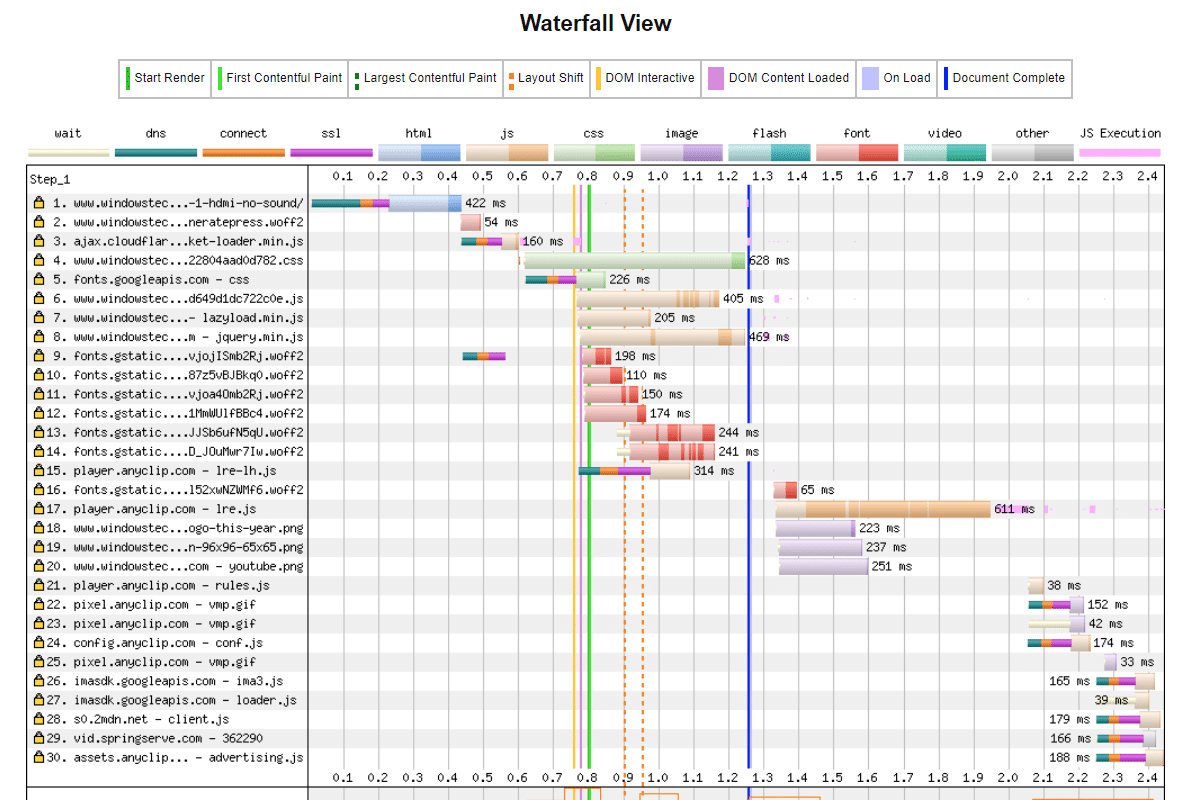
Ads play a significant role in the complete loading of the site.
If you are running video ads, then the page continues to load forever. Testing tools do not give a fair score for this hiccup. Instead, some devices can show degradation of score and speed.
Each test uses a different toolset to test the optimization features of the WordPress site and page.
Also, speed is a more impact signal than core web vitals.
User experience signals. Considered for ranking from June 2021. But core web vitals are a minor ranking factor at the current time.
WP Rocket Settings
The following settings were used for this test.
RocketCDN was not used for the test. Rocket Analytics turned off.
Since we are using AMP pages, mobile cache switched off. User cache is also off, as we did not have much restricted content.
Cache lifespan set to 24 hours. CSS minification turned off in WP Rocket as Autoptimize settings were doing it. Minification of JS files is enabled.
Following JS options turned on.
- Load JavaScript deferred.
- Delay JavaScript execution.
Lazy load enabled for images, iframes, and videos. YouTube iframe replaced with preview image. Add missing image dimensions checked. WordPress embed disabled.
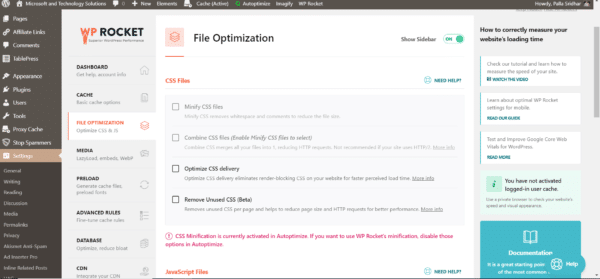
WebP caching enabled. The Imagify plugin is used to create and convert WebP images.
Preload cache and preload links enabled. No settings in Optimize Database turned on. We were using another plugin to clear transient data and optimize it.
Control Heartbeat enabled. Varnish cache is automatically detected by WP Rocket.
GTMetrix Test: WP Rocket vs Autoptimize
If you consider the paint metrics as an essential signal for ranking, then both of these tools together do a great job.
The time to first byte (TTFB) value is 197 ms, onload time is 533 ms, first contentful paint is 552 ms, and time to interactive is 1.0 s.

The web vitals are as follows:
- Largest Contentful Paint (LCP) = 8.0s
- Total Blocking time (TBT) = 112 ms
- Cumulative Layout Shift (CLS) = 0.16
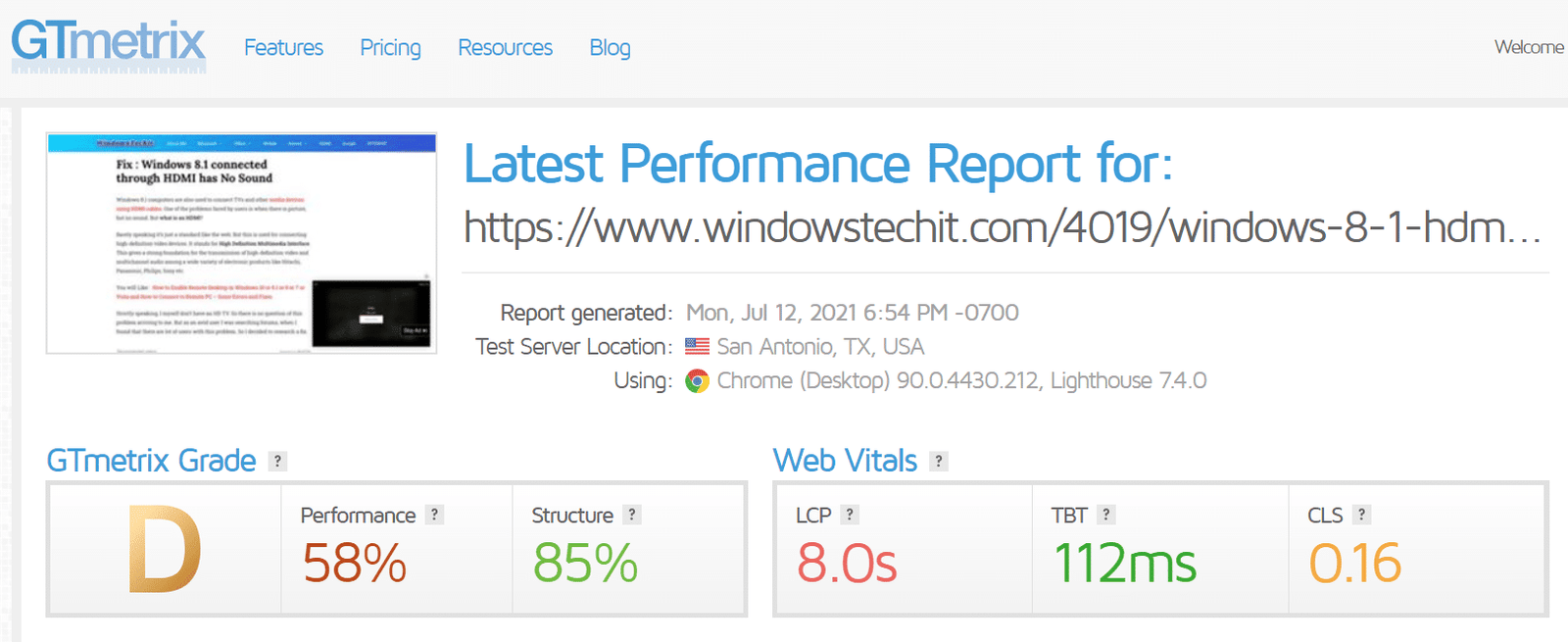
The total page size after optimization was 1.71 MB. The total page requests were 166. The top issues recommended by this tool for this test page and site were as follows:
- Use a Content Delivery Network (CDN)
- Serve static assets with an efficient cache policy
- Avoid document.write()
- Reduce JavaScript execution time
Most of the issues had a medium- to med-low impact. Most of them are related to Google Ads and video ad codes. A lot of third-party scripts were created by both of these advertising agencies. Most of the issues will resolve if the ads are removed. Then, we will have a perfect score.
The HTML size was 217KB and had 7 requests.
CSS size was 24KB and had 2 requests.
JS size was 660KB and had 28 requests.
Fonts were 165KB in size and had 8 requests.
Images were 107KB in size and had 93 requests.
This test was using Chrome 90.0.4430.212 and the Lighthouse version of 7.4.0.
Google PageSpeed Insights: WP Rocket + Autoptimize
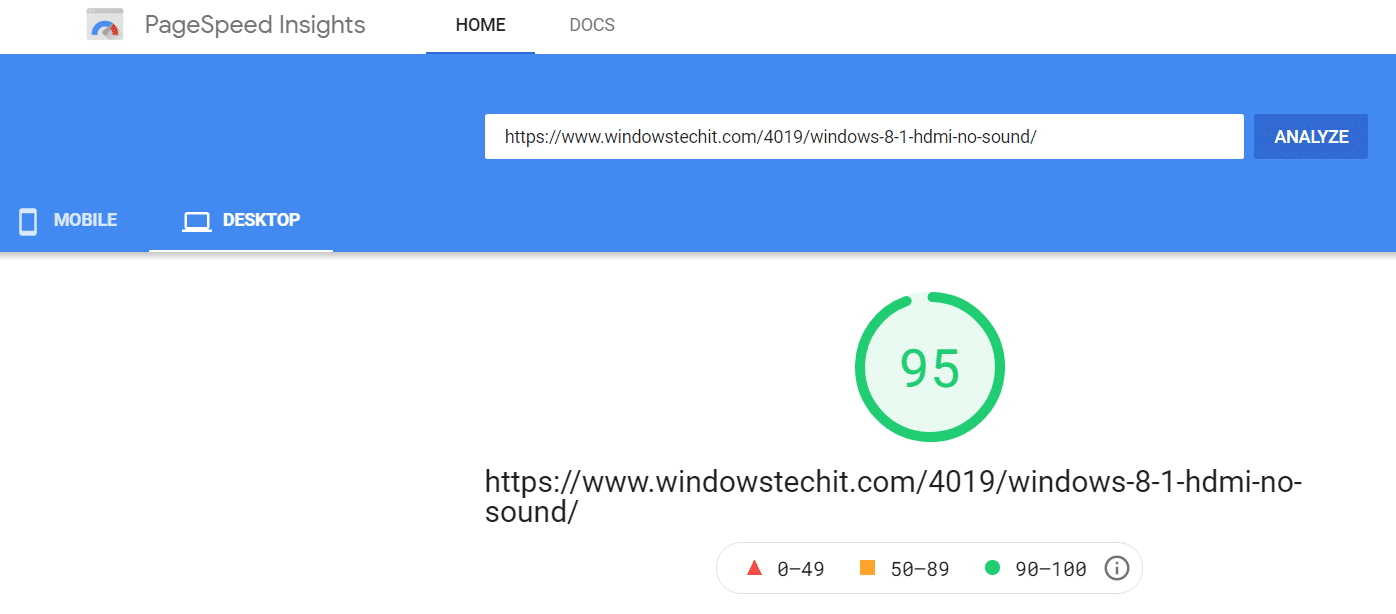
The total score was 95 on the desktop. Though it is not of complete relevance, WP Rocket and Autoptimize could move the score to a perfect 100.
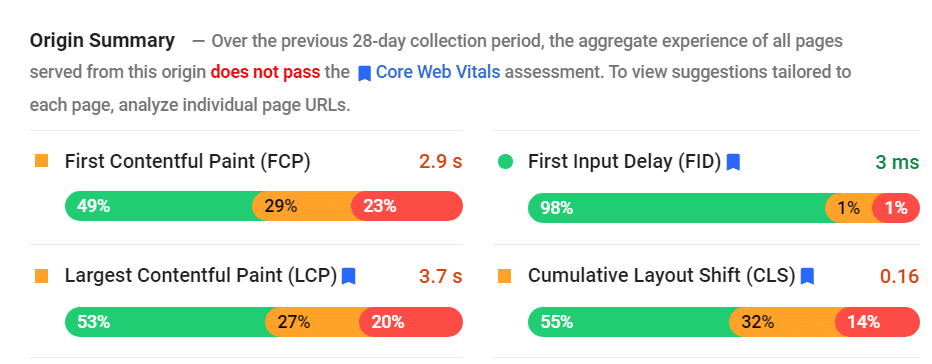
The origin summary was as follows:
Lab data was the following:
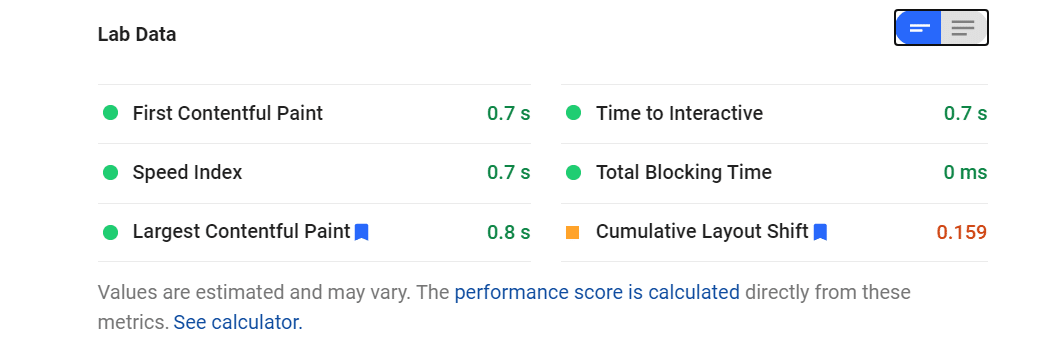
From the above image, we can say that the core web vitals had a green score on most metrics. The largest contentful paint was only 0.8s; the first contentful paint was 0.7s, with a total blocking time of 0ms and a cumulative layout shift of 0.159.
This test was using Chrome 90.0.4430.97 and the Lighthouse version of 8.0.0.
WebPageTest: WP Rocket + Autoptimize
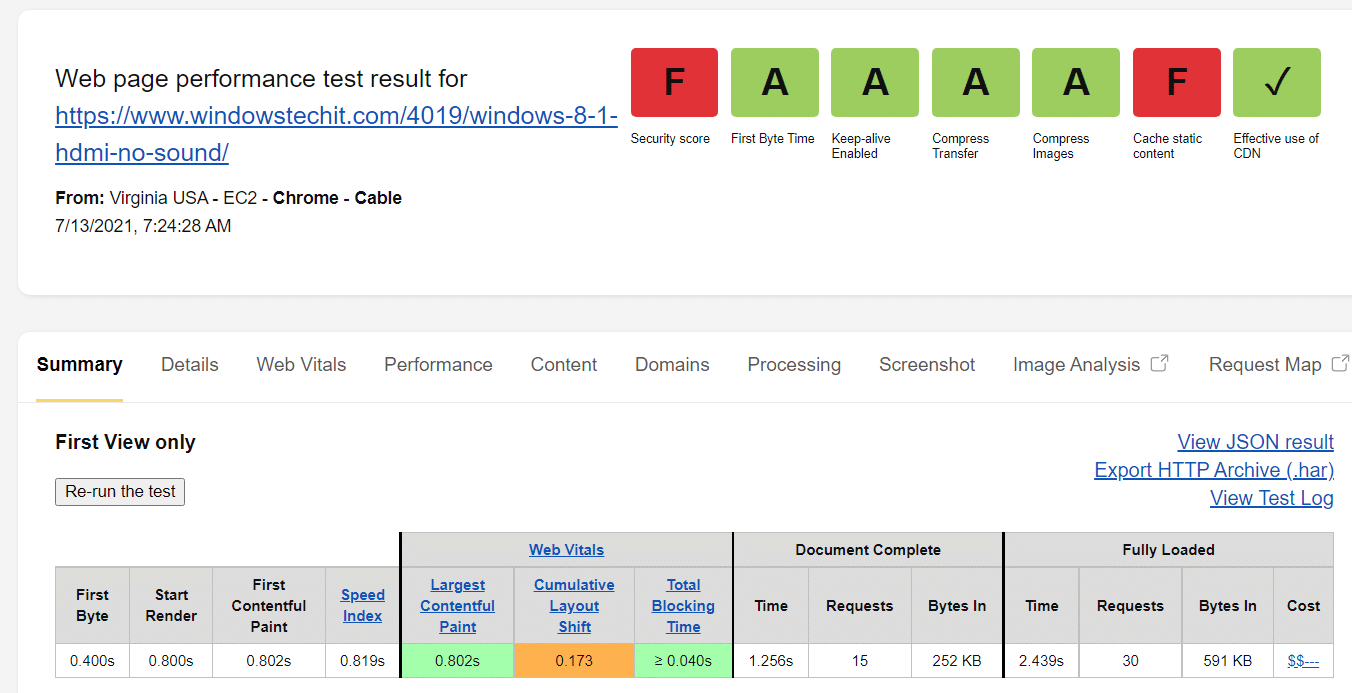
Most of the performance metrics were green in this test also.
The first view parameters were as follows:.
- First byte: 0.400s
- Start render: 0.800s
- First contentful paint: 0.802s
- Speed Index: 0.819s
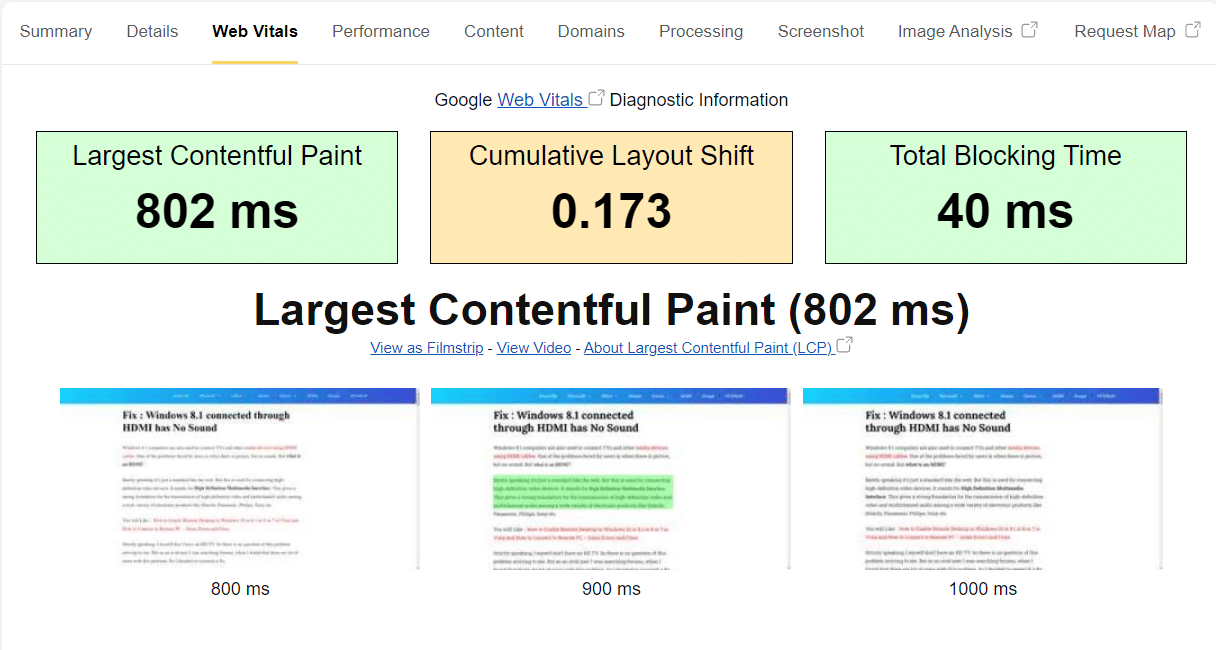
The web vitals were as follows:
- Largest Conteful Paint (LCP): 0.802s
- Cumulative Layout Shift (CLS) – 0.173
- Total Blocking times: 0.040s
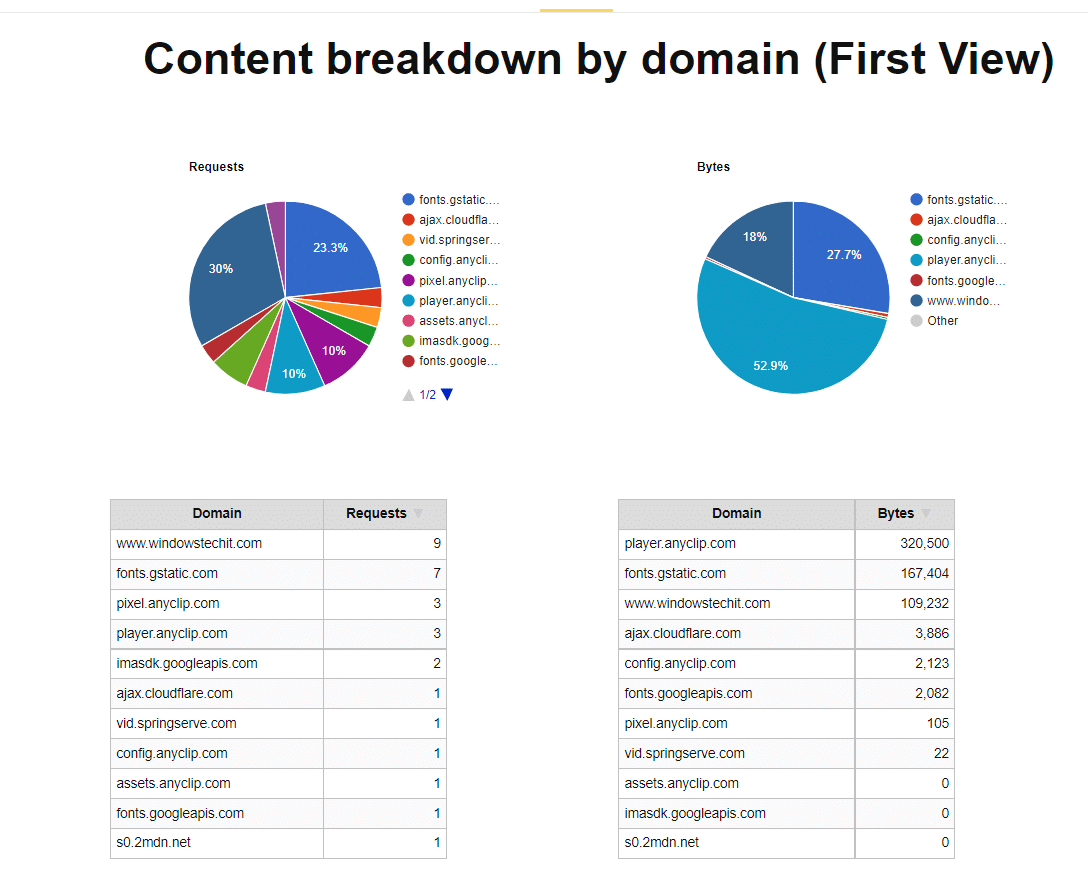
The fully loaded results were:
- Time: 2.439s
- Requests: 30
- Bytes: 591KB.
Conclusion
In all 3 testing tools, the page speed and user experience signals were very good with WP Rocket and Autoptimize settings.
The same test page did not have a great score with the Autoptimize plugin. It is because full page caching is not enabled.
But WP Rocket does a great job at both caching and minification.
WP Rocket is the ideal choice if you seek a straightforward, comprehensive solution that functions immediately. However, if you’re prepared to invest more time and prefer a free solution, Autoptimize can perform equally well.
What’s your experience with these plugins? Have you tried using them together, or have you found another tool that works even better? Drop a comment below—I’d love to hear your thoughts!