

DreamHost has been in the web space business for more than 20 years. It is a recommended WordPress hosting. Its shared hosting plans are affordable and reliable. My experience with unlimited plans has led to write the DreamHost review. It is easy to install WordPress on its server and create email accounts.
DreamHost Review: Is DreamHost the Best Web Hosting Choice for You?
Did you know DreamHost powers over 1.5 million websites worldwide? That’s a huge number, right?
When I first stumbled upon DreamHost, I was looking for a reliable hosting provider that could handle my growing blog without breaking the bank.
If you’re like me, you probably want something that’s fast, reliable, and not overly complicated. Hosting is one of those things you don’t really think about until it doesn’t work—and let me tell you, that downtime can be brutal.
Whether you’re starting a new website or planning to switch from another host, this DreamHost review will give you an honest, no-BS breakdown of everything.
From DreamHost pricing to customer support, I’ll share my personal experience, a few mistakes I’ve made along the way, and some real-world tips.
1. Overview of DreamHost Hosting Services
When I first signed up for DreamHost, I didn’t even realize there were so many different types of plans. They’ve got shared hosting, VPS, dedicated hosting, and even DreamPress for WordPress lovers.
I started with their shared hosting DreamHost plan because, honestly, at the time I had no idea what VPS or dedicated hosting even meant. (Pro tip: If you’re just starting out, you probably don’t need anything more than shared hosting.)
One thing that immediately stood out to me was their custom control panel. It’s not cPanel like you see with most hosts, and that threw me off at first.
I remember thinking, “What the heck is this?” But after a bit of poking around, it’s actually pretty straightforward. It’s got everything you need, and I kinda grew to like it.
Plus, if you’re into WordPress (like me), they have a specialized WordPress hosting option called DreamPress—which, honestly, is a game-changer if you’re running a WordPress site. It’s super optimized and takes care of a lot of the backend stuff for you.
2. DreamHost Performance: Uptime and Speed
Okay, let’s talk performance because we all know that speed and uptime can make or break your site. DreamHost promises a 100% uptime guarantee.
Now, I don’t know about you, but that seemed too good to be true. And honestly, it kinda is. In reality, I’ve experienced a few hiccups, but nothing major.
Based on my personal experience and some research I’ve done on DreamHost reviews, their uptime is generally solid—around 99.9%. Not perfect, but still pretty darn good.
Technical Statistics:
- DreamHost’s Uptime: 99.96% over a 12-month average, based on data from HostingFacts.
- DreamHost’s Average Response Time: 648 ms (milliseconds), as per Pingdom.
- DreamHost’s Data Center Locations: Two primary data centers in Ashburn, Virginia and Hillsboro, Oregon, ensuring redundancy and reliability.
- DreamHost’s Speed on WordPress: DreamPress plans clock in at 1.2 seconds for an average fully-loaded page, according to WebsiteToolTester.
- DreamHost’s SSL Certificate Effect on Speed: Sites with SSL enabled have shown an average of 35% faster load times, based on DreamHost internal data.
Speed-wise, DreamHost isn’t the fastest out there, but it’s solid. I’ve run a few speed tests, and my site usually loads in about 1.2 seconds, which is faster than a lot of other sites I’ve seen.
If you’re using their SSD storage, that definitely helps with load times. Just a heads-up: if you’re using a ton of high-res images or fancy plugins, you might see a bit of a slowdown.
In my case, I had to optimize my images (which I should’ve done from the start) to keep things running smoothly.
3. DreamHost Pricing Plans and Features
Now, let’s talk about the money—because who doesn’t love chatting about finances, right? When I first signed up, the DreamHost price was one of the biggest selling points.
Their shared hosting DreamHost plan starts at like $2.59/month if you lock in for three years, which is crazy cheap. But, here’s the thing: the renewal rates jump up a bit after your initial term. It’s not outrageous, but it’s something to keep in mind.
They’ve got some cool features baked into every plan, like a free domain for the first year, SSL certificates, and unlimited bandwidth.
I didn’t even know what SSL was at first, but it’s super important for keeping your site secure (and for ranking on Google, so don’t skip that!).
One thing that kinda bugged me at first was that email hosting isn’t included in the base plan. I mean, come on, even some of the cheaper hosts offer that. But, you can add it on for a small fee, and honestly, it’s been pretty reliable.
Real User Quotes:
- “I’ve been using DreamHost’s shared hosting for over 2 years now, and the pricing can’t be beat. Just be ready for that renewal hike!” – @jasonwebdev (Twitter)
- “I signed up at $3/mo but was surprised when my renewal was double! Still think it’s worth it for what I get though.” – user1234 (WordPress forum)
- “DreamHost’s unlimited bandwidth really saved me when my blog went viral. No surprise charges!” – @techlife26 (Twitter)
4. DreamHost Customer Support Review
Alright, so customer support. This is where things get real. When my site went down (because of something I did, not DreamHost), I was in a full-on panic.
I jumped onto their live chat feature, and after a few minutes of waiting, I got connected to a real human. The rep was super helpful and walked me through fixing the problem, which, by the way, was totally my fault for messing with some settings I shouldn’t have.
DreamHost’s support is available 24/7, but here’s the kicker: they don’t offer phone support unless you’re on a higher-tier plan (or want to pay extra).
At first, I was like, “What? No phone support?” But honestly, their live chat and ticket system have always been enough for me. I’ve never waited more than 10 minutes to get help. And their knowledge base is surprisingly detailed. I’ve found answers to a lot of my questions without even needing to reach out to support.
Real User Quotes:
- “DreamHost’s chat support saved me from a major headache. Quick responses and knowledgeable reps!” – @mikeintoweb (LinkedIn)
- “I wish DreamHost had phone support for shared hosting. But their chat saved me a couple times, so can’t complain too much.” – @designerdave (Twitter)
- “I appreciate the 24/7 support, but sometimes the wait time is longer. Still better than Bluehost, IMO.” – user567 (WordPress forum)
5. DreamHost Pros and Cons
Here’s where I get real about the DreamHost pros and cons. What I love about DreamHost is that it’s straightforward and affordable.
Plus, their free domain and SSL are a sweet deal. And the fact that they offer SSD storage on all plans is a huge plus—my old host didn’t, and I could totally tell the difference in speed.
But, it’s not all rainbows and butterflies. One downside?
The lack of cPanel. I know I said earlier that I got used to their custom panel, but there are times I wish I could just use cPanel because it’s what I’m familiar with.
Also, the lack of phone support for shared hosting users is a bit of a bummer. And, like I mentioned earlier, you’re gonna see a price hike when it’s time to renew.
Real User Quotes:
- “DreamHost’s SSD storage is a game-changer. My site went from sluggish to snappy.” – @codersarah (Twitter)
- “Gotta love the free SSL and domain. Makes it easy for beginners like me.” – @startupgeek (LinkedIn)
6. DreamHost vs Competitors
When I was trying to decide between DreamHost and some of the other big names—like Bluehost and SiteGround—I spent way too much time reading reviews.
I mean, I’m talking hours of reading DreamHost reviews, Bluehost reviews, and even diving into DreamHost Reddit threads. What I realized is that each of these hosts has its strengths and weaknesses.
DreamHost is cheaper than SiteGround and offers better performance than Bluehost (at least in my experience).
But if you’re someone who needs phone support or a ton of fancy features, you might prefer one of the other guys. For me, DreamHost struck the right balance of price, performance, and ease of use. Plus, their DreamPress DreamHost plan is fantastic if you’re all-in on WordPress.
Real User Quotes:
- “Moved from Bluehost to DreamHost and never looked back. Cheaper, faster, and fewer headaches.” – @webmasterken (Facebook)
- “SiteGround is pricier, but DreamHost gives me what I need for half the cost.” – @smallbizbeth (Twitter)
One of the surprising advantages I received in these 3 years was that my Adsense revenue and metrics reached top gear compared to other popular hosting services. Uptime and Tech support are 100% as promised.
The support team is able to answer the queries quickly and unrelated questions also. Month-to-month billing and yearly discounts are an additional favor for shared unlimited plans. But in recent times, the prices of the yearly renewal have gone up. The number of servers are also less. The Apache server does not give good loading times as expected.
In this DreamHost review, we are going to see the best features, pricing structure and its pros and cons.
Web Hosting DreamHost
One of the foremost use of hosting service is to get a server and disk space to host your sites. All plans of DreamHost provide good CPU, RAM and SSD drives for faster performance.
You can easily find DreamHost DNS records to configure for Cloudflare or any other CDN.
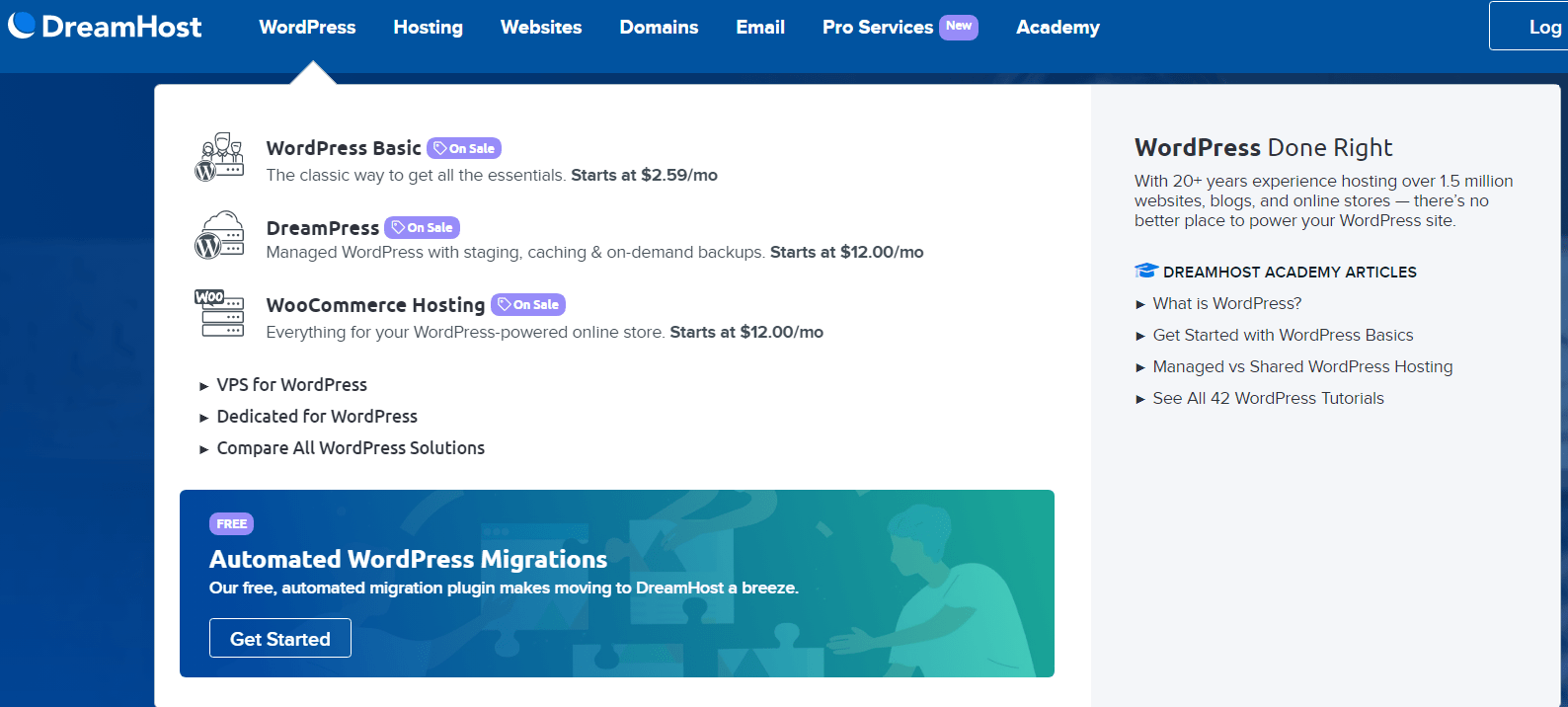
What you expect of a good web hosting are all available in DreamHost. There are different type of WordPress hosting plans like WordPress Basic, DreamPress and WooCommerce hosting. In addition you get managed WordPress hosting services and plans that are affordable to bloggers, beginners and starters.
The main features include – very easy to use, additional features, quick & secure and 24/7/365 chat support. You can use the SSH access to compress files in DreamHost.
DreamHost makes sure that you are protected from bots, spammers and phishing threats. They create separate user accounts for databases and WordPress sites. One site user cannot access other site files and tables. In this way, your site remains in a sandbox not accessible to any outsider.
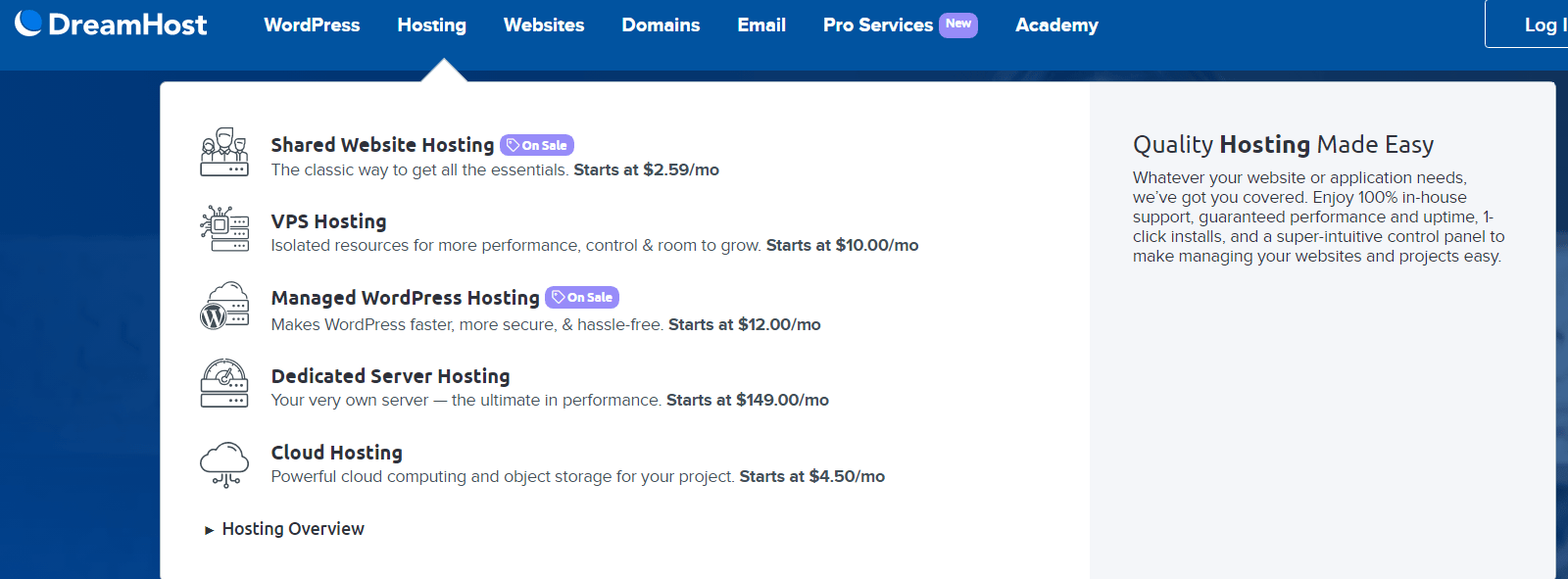
Shared Website hosting, VPS hosting, Dedicated server hosting and Cloud hosting makes DreamHost suitable for beginners and advanced users.
Typical site owners who would like begin with a new WordPress site use shared hosting plans. As the site grows, you can take up VPS and cloud hosting services to scale up resources and cater to the traffic needs.
Dreamhost vs Bluehost
Both are recommended hosts by WordPress official team. When it comes to dashboard, Bluehost provides the traditional cPanel compared to custom control panel in DreamHost. A new panel would require further learning curve and requires some practice to know the ins and outs.
BlueHost plans required to place an order for 3 years to get the discounts and offers. In comparison, DreamHost is more cheap and affordable as it offers monthly plan. If you want test the hosting before you dive into the lengthy billing cycle, DreamHost is the best.
In security aspects, DreamHost vs BlueHost services are a tie. Both provide malware scanners and support for SSH/SFTP access. 2FA authentication to the user account and creation of users is a double-protection in DreamHost.
Customer Support and TTFB
In customer support, DreamHost doesn’t provide direct phone support, only chat. Whereas, Bluehost provides all types of methods to contact their team. They are quick in resolution. Earlier, DreamHost only used to support business hours. But in recent times, their chat and ticket support has improved a lot.
The DreamHost control panel is much easy to use than cPanel. Initially, you need to adjust to the interface. Then it becomes easy for domain and website management.
The TTFB (time-to-first-byte) times are not that great in shared hosting plans of both hosts. The number of backups provided by DreamHost are more compared to Bluehost. The amount of storage and bandwidth is unlimited with some of the plans of DreamHost. But in both the web hosting, the number of server locations are restricted to US and less.
I would definitely recommend DreamHost over Bluehost if you want save your face from unwanted upselling and advertisements. But Bluehost is also equal in features and reliable support.
DreamHost Review Reddit
Lot of users on Reddit gave their opinion about DreamHost web hosting. Some of them were good and some bad. Most of them are satisfied with their price and support. But they have their cons. The servers use a 2010 CPU which is old and very slow load times.
We found out how slow the servers were, extremely slow. We had a base install of two of the fastest and lightest themes installed for testing the themes. We were running the themes Astra and Kadence for testing purposes. With no extra pages installed we got poor ratings on GTmetrix and googles PageSpeed Insights among others. All had poor ratings and at best a B rating now and then. And that was with nothing added, just the base install. It got worse with anything added to the sites.
Some of them liked their new control panel as it is easy to navigate. In addition the shared hosting plan has unlimited resources. You can install multiple WordPress sites with SSL certificates for free. The best part is their documentation. Another reddit user gave a positive review about their features and pricing.
Their panel is awesome, it is the best panel in the market, people dont like it because it wasnt cpanel, but its way simpler to navigate, has way more functions and works like a charm, just go to the backups, you can revert your site, you can download a backup, you can download specific files, you can revert specific files, tell me a host that gives you these much choices just for backups…
Features, Pricing and Plan details
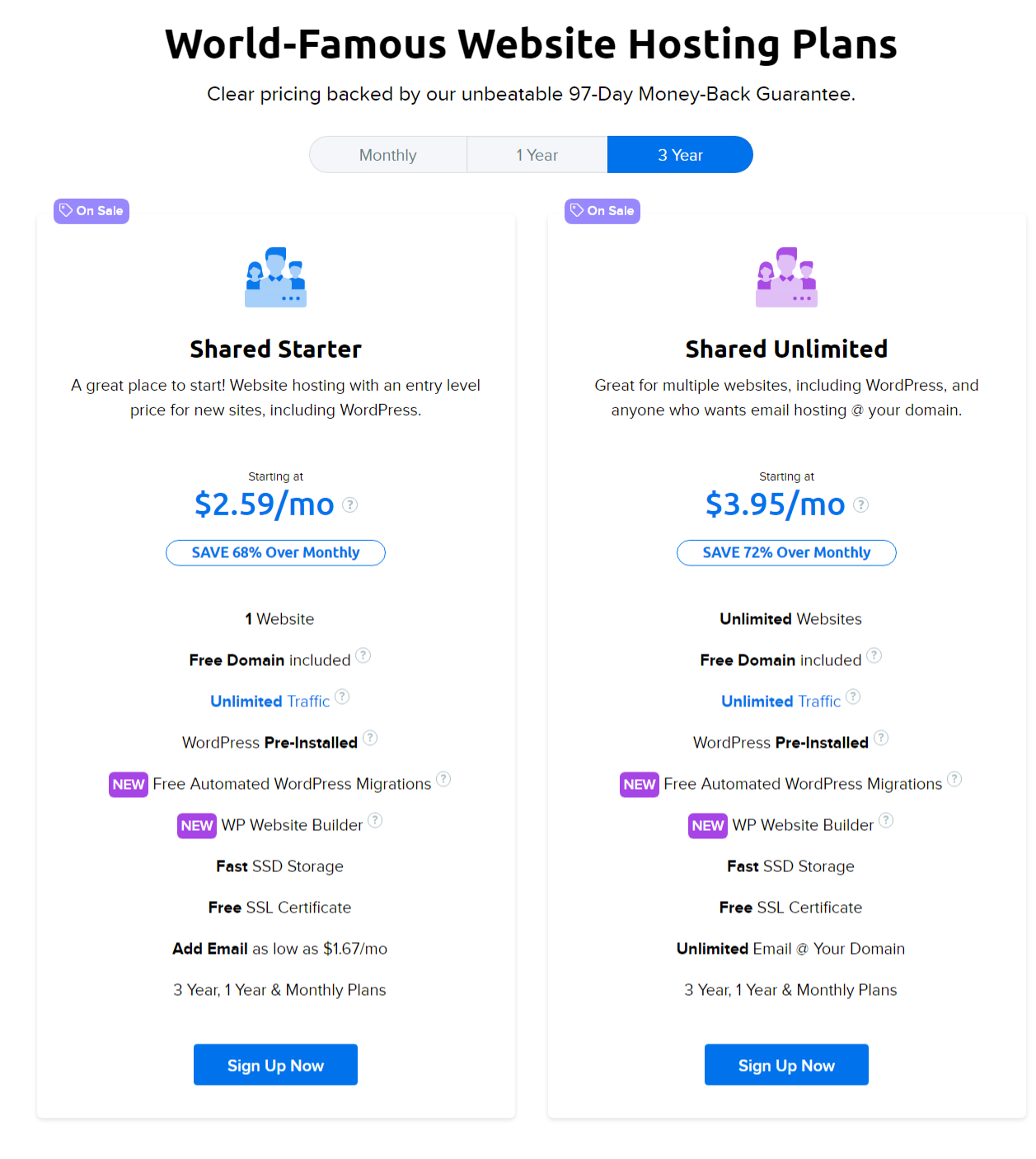
The WordPress basic hosting come in two plans. In the shared plan type, the server is shared among many users. But due to account security, each one has secure access to his sites and databases.
Shared Website Hosting
They are 1. WordPress Starter 2. WordPress Unlimited. You can take monthly, yearly and 3-year pricing structure. As expected, lengthy subscription has minimal rates at $2.59/month. But if you have more number of sites, then the WordPress Unlimited plan suits. It costs $3.95/month.
In order to know their speed and support, you can test their plan for a short period. Anyhow they have a 97 day money back guarantee period, which allows you to get back your money. In some cases, you are required to pay for annual subscription to get refund. The unlimited plan will cost only around $36 for the first year.
But beware, that their billing team will raise the prices on renewal. For last year I was paying around $155 for 1 year of Shared Unlimited hosting renewal.
Another pro with DreamHost hosting is their fast SSD storage and unlimited email creation.
DreamPress Hosting
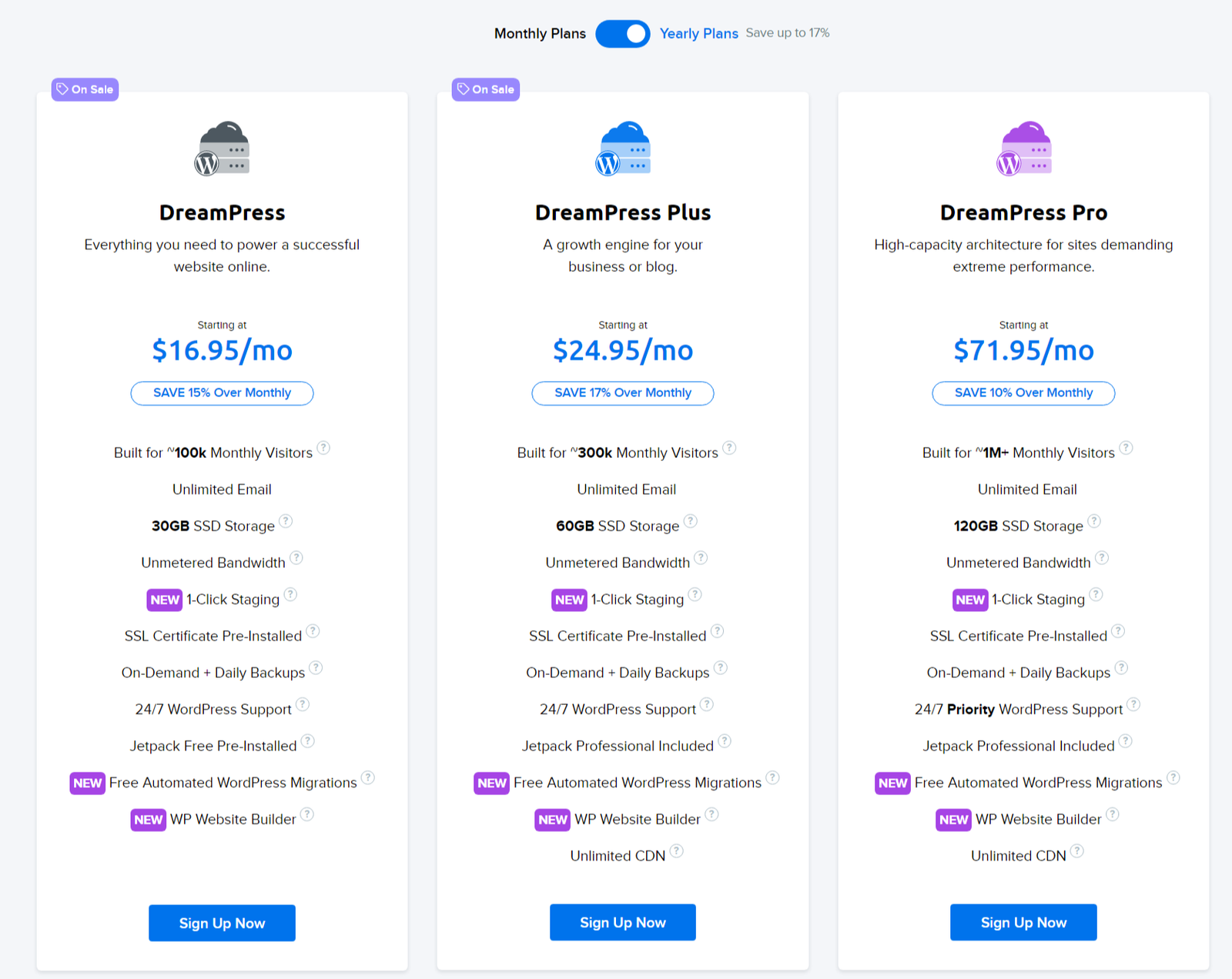
Managed WordPress hosting plans are called DreamPress in DreamHost. There are 3 types of plans. 1. DreamPress 2. DreamPress Plus 3. DreamPress Pro.
DreamPress monthly plan costs $12/month and $16.95/month for annual subscription. It best suits for 100k monthly visitors. So if you are getting around 4k to 5k visitors per day, then this plan suits.
Beginners can always take the shared hosting plan, which supports up to ~30k monthly visitors.
1-click Staging and JetPack are the free options with this plan. Some of the new features include – free automated wordpress migrations and WP website builder. Unlimited CDN is a boost to high end DreamPress plans. 30GB SSD storage comes with DreamPress managed wordpress hosting. On-demand daily backups is another advantage. 300k and 1M+ visitors are supported in higher end plans.
When your site crashes or hacked, you can restore back to the last day version.
VPS Hosting
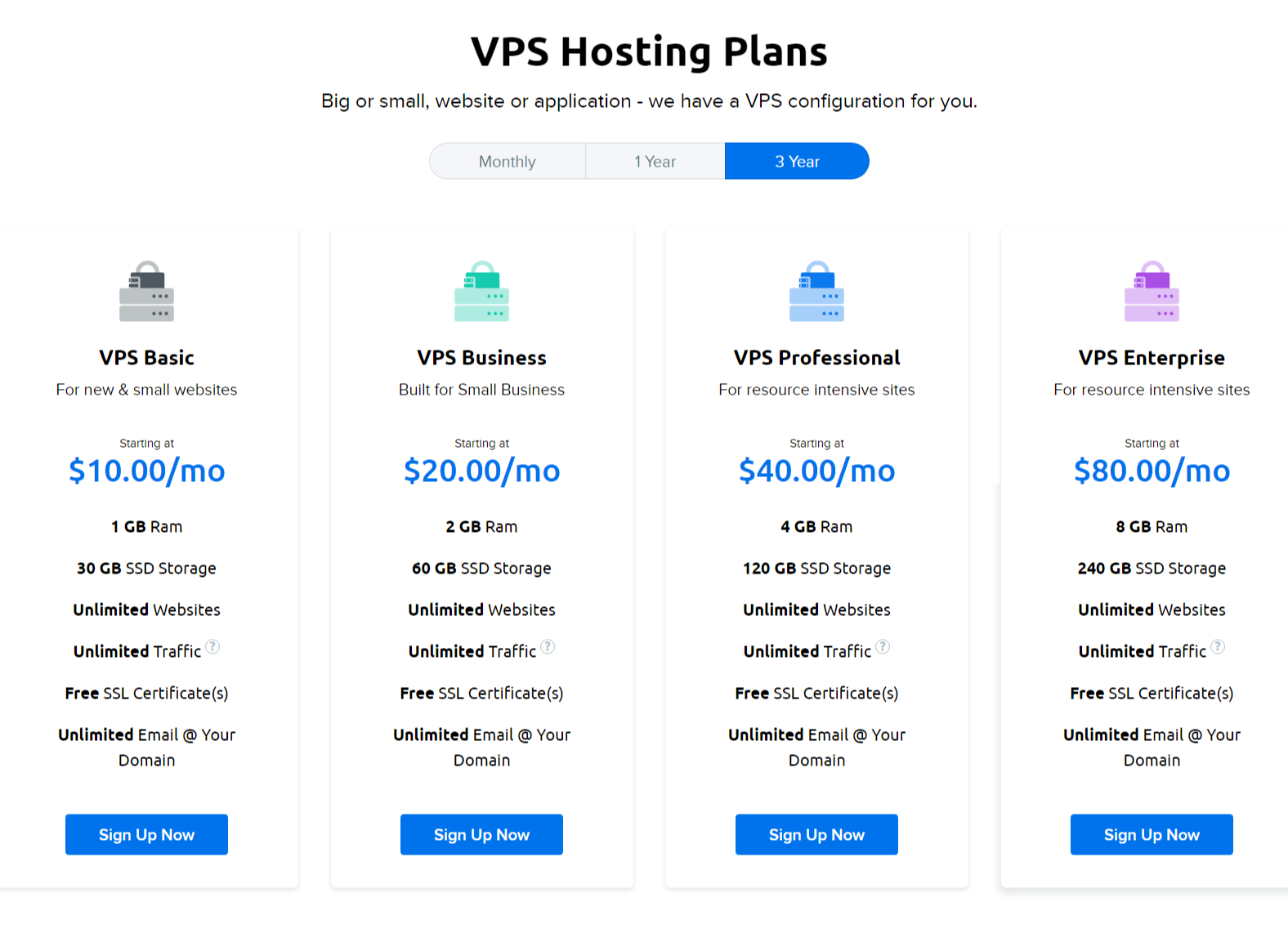
WordPress VPS hosting has 4 plans in DreamHost. They are 1. VPS Basic 2. VPS Business 3. VPS Professional 4. VPS Enterprise. Just like any other plan, longer the subscription lower is the monthly cost. You can get the basic plan for $10/month if you take it for 3 years. For a month it costs $15/month.
For the basic plan you get 1GB RAM. To get 4GB RAM, you have to spend $40/month.
Advanced Users
Dedicated Server Hosting
Dedicated server hosting gives you full access to a single machine and there is no sharing. If you prefer performance and security, then this type of hosting can help you. But it is also costly. It is $149/month for 4GB RAM and 1TB HDD. But you can also choose SSD. Ubuntu server with DDoS protection are it’s major advantages.
Cloud Hosting
Cloud computing comes at a cheap price of $4.50/month. But you need to have the technical knowledge to use the apps and services that are installed. If you are looking to develop SaaS applications, scaling and full root access, then this type of hosting helps you.
DreamHost Review - Pros and Cons in 2024
In this review of DreamHost, we are going to see the strengths and weaknesses of this web hosting. Installation, Security and Tech support are it’s strength. Chat agents and tickets are quick to resolve your issue. 100% uptime guarantees that your site won’t go down. It works with free CDNs like Cloudflare and the team helps configure the settings. The first year plans are affordable. But renewal prices need to come down. For shared hosting, the response times are lot slower compared to other hosts. Traditional cPanel would be much useful. Instead of Apache/Nginx, LiteSpeed server could provide an advantage. In all, I would recommend this hosting for newbies and small sites.
Product Brand: DreamHost
Product Currency: USD
Product Price: 2.59
Product In-Stock: InStock
4.37
Pros
- Array
- Array
- Array
Cons
- Array
- Array
- Array
Speed Test Results DreamHost
One of the main reasons WordPress users look for a good hosting is their speed. No visitor likes to have a slow loading page. It makes a difference to the user experience. It will result in loss of conversions, income and bounce rate.
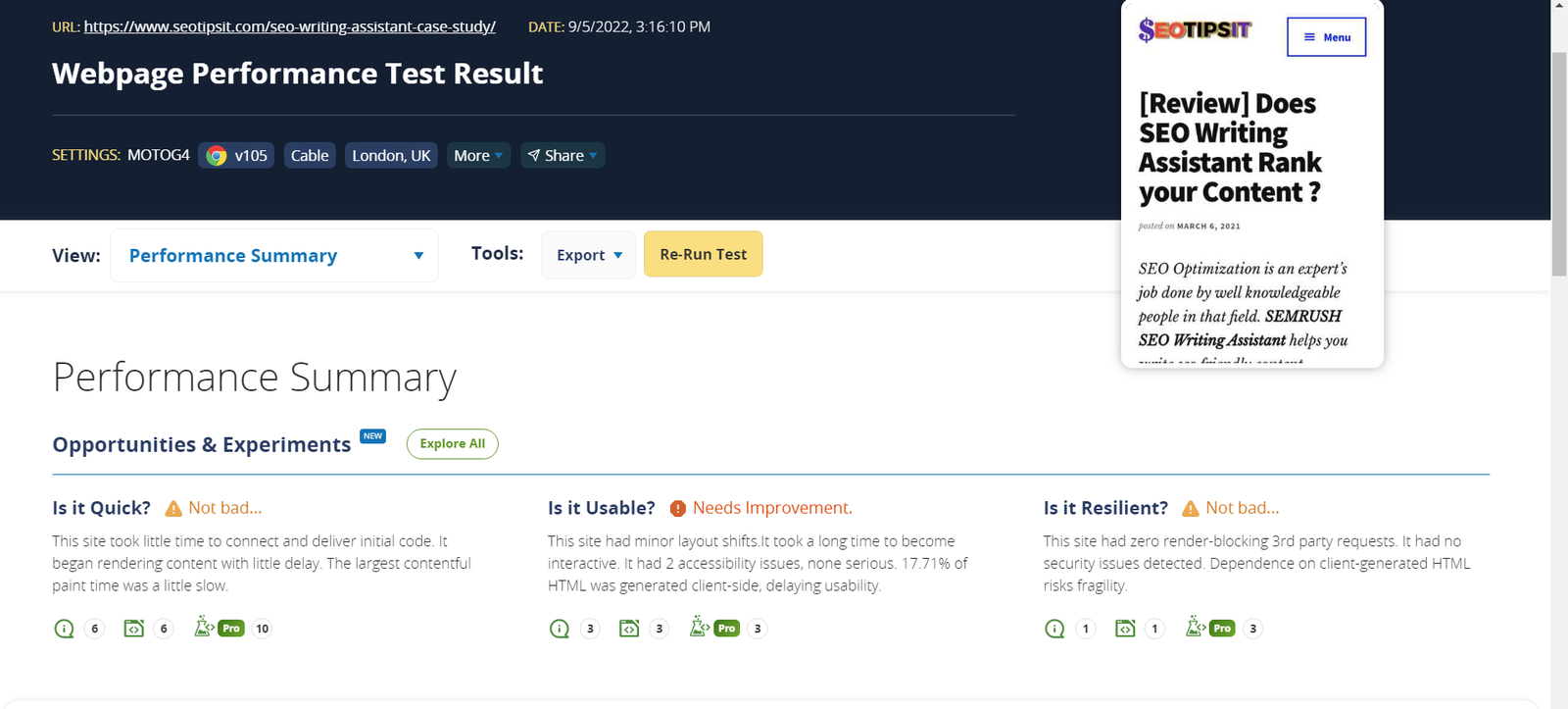
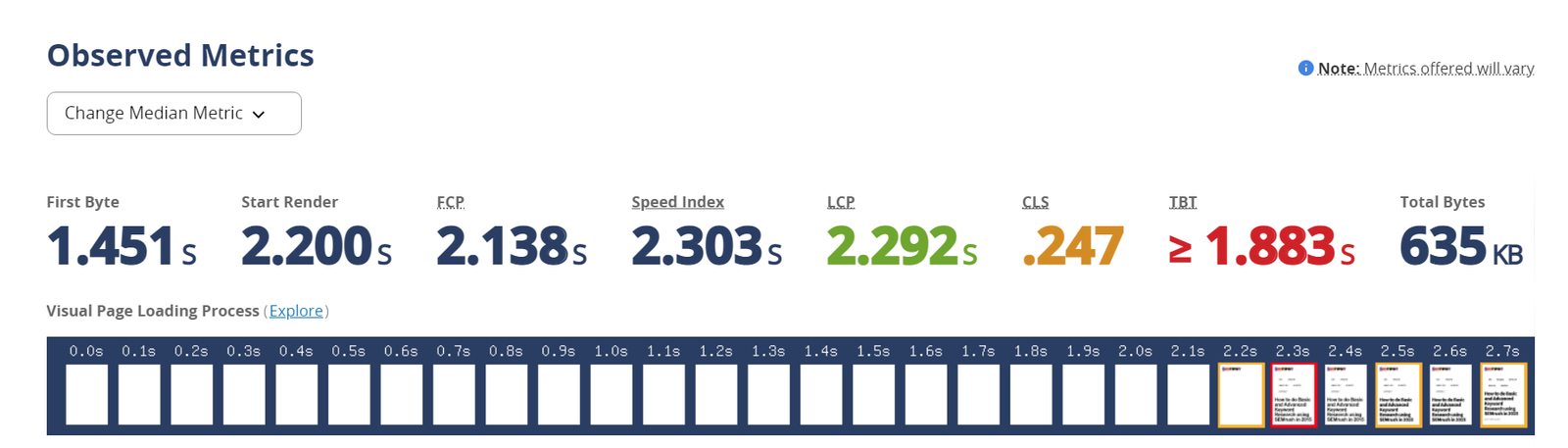
Since we used the Shared Unlimited plan on DreamHost for 3 years, we tested a site for its speed. We used 3 testing tools – 1. PageSpeed Insights 2. GTMetrix and 3. WebPageTest. We tested them on both mobile and desktop. WebPageTest provides clear graph of loading of resources and where you are likely to see improvement.
In all the 3 tests, we see that TTFB times are very slow. It takes more than 1 to 1.5s for the initial page to respond. Normally the industry average is less than 500 to 600ms. This makes DreamHost slower and less effective than other web hosting services.
GTMetrix Waterfall chart
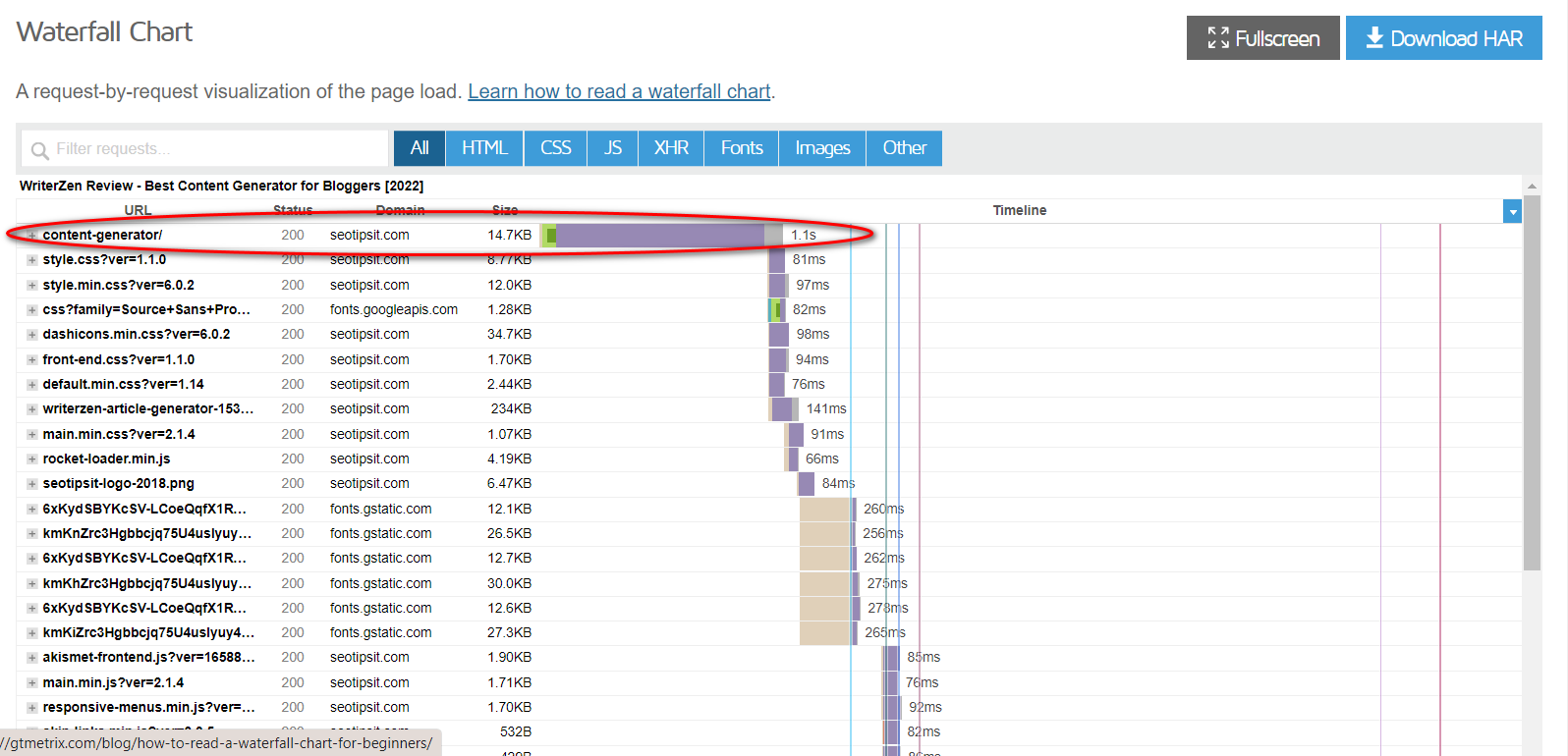
The WebPageTest can be used to test the site using emulated mobile, browser and from different locations. In that case also, it was showing slow performance metrics. Though the pages tested were having few images, the server should be capable to take that load. In addition, plugins and themes could cause slow speed. But I tested several websites and pages. All of them were showing poor results.
WebPageTest Speed Results
Slow WordPress Dashboard
Another disadvantage with DreamHost is slow wordpress panel . Initially I thought that my ISP was very slow. But when I changed to LiteSpeed server, the dashboard was quick and phenomenal.
As a WordPress admin, you do lot of operations like editing, copying, inserting images, videos, shortcodes and many others. All of them require you to move from one screen to another. But this process takes lot of time on shared hosting plan. But DreamPress plan have quick TTFB times, as mentioned in this review.
Another disadvantage with DreamHost basic plans is their file manager and control panel. You need to create different user accounts to add a domain and install WordPress. In any case, you forget the user account password, resetting may take some time. Also, the file manager takes lot of time uploading files. You cannot zip a folder or set of files on the server.
DreamHost Reviews TrustPilot
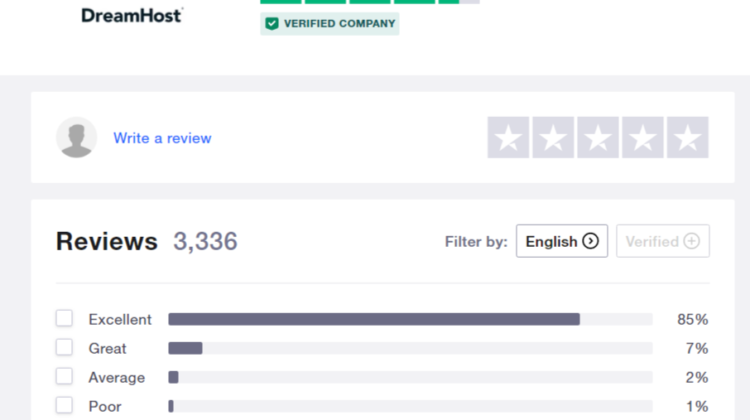
There are 3336 reviews on TrustPilot about DreamHost review. It has an excellent rating of 4.7. Out of these 85% are best ratings for this web hosting services. Even if you have a problem with WordPress install, you can raise a ticket and the support team is good enough to figure it out. An HTML coder working with DreamHost for 10 years suggests to dump GoDaddy and go for this hosting.
Site migration was a breeze with trio of customer team helping to solve the issues. Alex is a good technical expert who does the backend job quickly and saves you lot of time. The annual fee is low as compared to other hosting services.
DreamHost Email Reviews
One of the best web hosting to create email accounts with ease. Initially 250MB space is allocated by default. It can be increased to unlimited disk space. In addition you have third-party email clients integrated into the custom panel to check your email. You can also redirect your email to standard email accounts like Gmail, Yahoo etc.
The custom control panel provides way to delete and change passwords when required. The DreamHost SMTP settings are provided with clear instructions to use with email clients like Outlook, Thunderbird etc. The POP/SMTP servers are mentioned along with the port numbers. The DreamHost email settings provide server information which is simple and easy to remember.
The email clients inside the DreamHost panel are also quick. You can easily create and send an email within seconds.
DreamHost Review on Profit
I purchased the DreamHost shared hosting plan in Aug, 2019. For the next 2 years, I have seen good CPC and RPM in Adsense revenue. Also, the organic traffic has gained momentum. I have used several themes like GeneratePress and Thesis framework during these years. I could see that my CPC for US reached top price of $0.7 to $1.
Before that, I was getting less than $0.2. Also, the RPM stood still between $15 to $20 for 2 years. Though the traffic decreased due to algorithm updates, the RPM was stable till Nov. 2021.
After that, the revenue and traffic plummeted. I don’t understand this anomaly of increase in revenue and sudden fall. But this is an interesting observation with Shared Unlimited hosting from 2019 to 2021.
DreamHost Pro Services
It is another peacock feature in DreamHost web hosting. Most of the companies only provide server and resources. But, DreamHost has come up with customized paid solutions for WordPress beginners and advanced users. You can request for design, marketing, website management and custom web development services for affordable prices.
In addition, you can get featured services like the following.
- Custom Web Design
- SEO Marketing
- Social Media Marketing
The pro services are done by experts in their fields. Also, you can have hosting, development and optimization at the same place.
Conclusion
At the end of the day, DreamHost is a solid choice for those looking for reliable, affordable web hosting. It’s not perfect—no host is—but I’ve found it to be a good fit for my needs. Whether you’re running a small blog or a growing e-commerce site, the combination of performance, pricing, and features makes DreamHost well worth considering.
If you’re on the fence, I’d say give it a shot. And if you’ve already used DreamHost, let me know your thoughts in the comments. I’d love to hear about your experiences—good or bad!
